
Research
How to make a reel on Instagram (2026 steps, specs and ideas)


On this page
How to make a reel on Instagram: tap Create, tap REEL, then record with the Record button or add clips and photos from your camera roll. Tap Next to add music, text, stickers or effects. Tap Edit video to trim and reorder clips on the timeline, then tap Next, pick a cover, write a caption and tap Share. Export at 1080 x 1920 (9:16) and keep it to 3 minutes or less if you want new people to see it.
If you post for a business, the fastest way is Postdom, the AI social media tool. Paste your website into its URL to video converter and Postdom makes branded Reels from it, with the hook written on screen, music, voiceover and captions, and on paid plans an AI persona who presents the video. You approve the ones you like and Postdom posts them to Instagram Reels, and to TikTok, YouTube Shorts, Facebook and LinkedIn if you want. No filming, no editing. Paid plans start with Starter at $39 a month for 30 posts. Starter, Growth and Scale start with a 7-day free trial, and you can cancel anytime.
We checked every step and spec below against Instagram's help center (iPhone app) on 11 October 2026. Labels can differ slightly on Android or after an update.
What is a reel on Instagram
A reel on Instagram is a vertical video of up to 20 minutes, made of one clip or several, that you make and edit in the Instagram app or upload from your camera roll, with music, text and effects. Reels show in the Reels tab and on your profile, and they can reach people who don't follow you, though Instagram only recommends reels of 3 minutes or less to new audiences, according to its help center.
How to make a reel on Instagram, step by step
These are the 8 taps in Instagram's own reel editor, on the iPhone app.
- Tap Create. From your Feed, tap Create at the bottom of the screen.
- Choose REEL. Tap REEL at the bottom.
- Record or add clips. Tap Camera at the top to record something new. Tap and hold Record to film a clip, or tap once to start and again to stop. To use photos or videos you already have, tap your camera roll in the bottom left.
- Set up the shot. Use the tool menu on the left before or between clips: Music, Effects, Speed, Layout, Length (how long the next clip records, with a countdown), Dual camera and Align clips, which shows a see-through frame of your last clip so the next one lines up.
- Add audio, text and stickers. Tap Next. Add music from Audio, type text on screen, and add stickers or effects.
- Edit on the timeline. Tap Edit video in the bottom left. The timeline shows your clips, text, stickers and music. Drag the trimmers to shorten a clip, tap Reorder to move clips, tap a text box to change when it appears, or tap Add clips for more. You can undo or redo up to 20 actions.
- Add a cover and caption. Tap Next. Tap Edit cover to pick a frame or upload an image, then write a caption of up to 2,200 characters with up to 5 hashtags. Under More options you can let others use your reel as a template, allow downloads, or schedule it. If your account qualifies, you can also tap Trial to share it as a trial reel, which goes to non-followers first.
- Share. Tap Share. The reel appears in the Reels tab, on your profile and, if it's 3 minutes or shorter, can be recommended to people who don't follow you.
Instagram notes that some tools, like the music sticker, aren't available to everyone. If you can't find one, update the app first. If you film in another app and upload, run the file through our free video spec checker before you post. If you would rather generate the clips than film them, see how to make AI videos.
Instagram reel size and specs
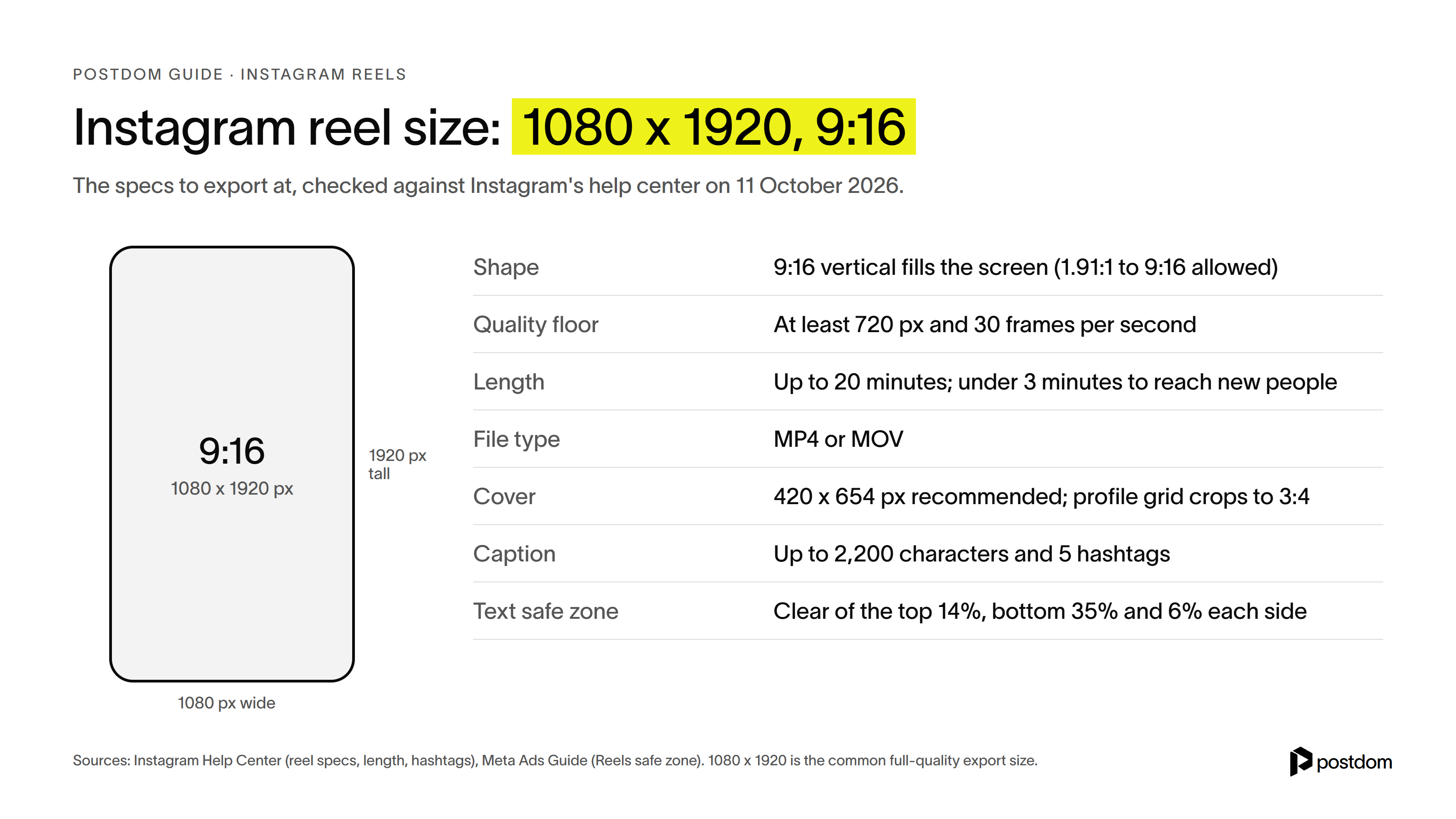
The Instagram reel size to export at is 1080 x 1920 pixels, a 9:16 vertical video that fills the phone screen. Instagram accepts anything from 1.91:1 to 9:16, but at least 720 pixels and 30 frames per second, according to its help center. Here is everything in one place. Our Instagram reel size and dimensions guide covers crop and fit in more detail.
| Spec | What to use |
|---|---|
| Size | 1080 x 1920 pixels |
| Aspect ratio | 9:16 (Instagram accepts 1.91:1 to 9:16) |
| Minimum quality | 720 pixels and 30 frames per second |
| Length | Up to 20 minutes; under 3 minutes to be recommended to new audiences |
| File type | MP4 or MOV |
| Cover | Help center figure: 420 x 654 pixels; a 1080 x 1920 frame works; the profile grid shows a 3:4 crop |
| Caption | Up to 2,200 characters |
| Hashtags | Up to 5 per reel |
| Text safe zone | Keep text out of the top 14%, the bottom 35% and 6% on each side |
| Scheduling | Up to 25 posts a day, up to 30 days ahead (public accounts) |
Instagram reel safe zone
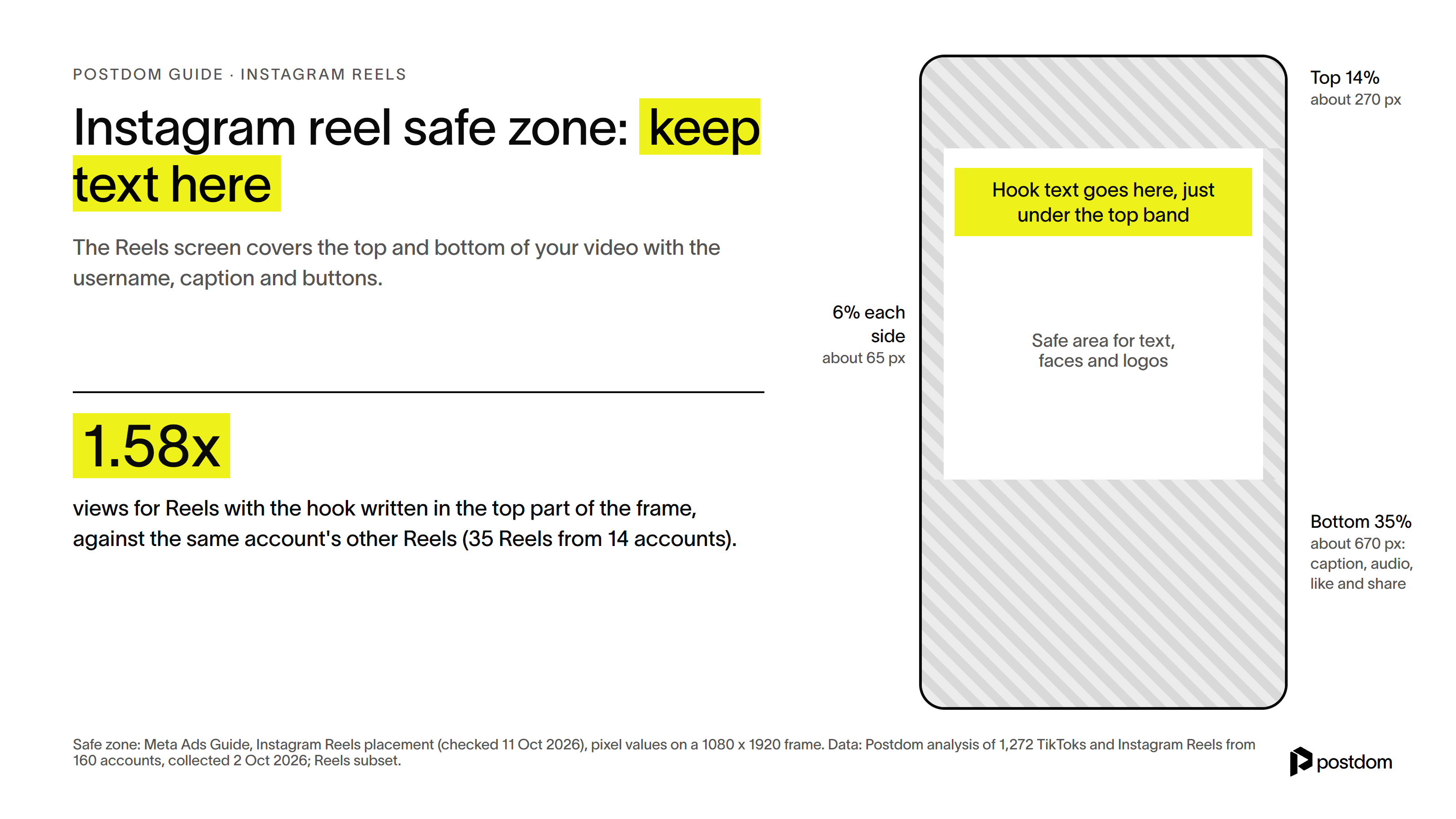
The Reels screen lays your username, caption, audio and buttons over the bottom of the video, and the top carries the Reels header. Meta's ads guide for Reels says to keep text and logos clear of the top 14%, the bottom 35% and 6% on each side. On a 1080 x 1920 frame that's about 270 pixels at the top, 670 at the bottom and 65 on each side.
Put your hook just under the top band. In Postdom's study of 1,272 short videos, the 35 Reels (from 14 accounts) with the hook written in the top part of the frame drew 1.58 times the views of the same account's other Reels. It was the only text placement on Reels with a statistically clear lift. Check your frame with our free Instagram safe zone tool.
How long can a reel be on Instagram
You can record or upload a reel of up to 20 minutes, made of one clip or several, according to Instagram's help center in October 2026. The progress bar at the top of the camera shows how much you've used.
The catch is reach. Instagram says reels over 3 minutes won't be recommended to new audiences, so keep any reel you want strangers to find under 3 minutes. In our data, length made no reliable difference to views within that range, so cut to the story rather than to a target length.
How to make a reel with photos
You don't need video. Instagram's help center says you can add photos and clips from your camera roll to a reel. To make a reel with photos:
- Open the reel camera. Tap Create, then tap REEL.
- Pick your photos. Tap your camera roll in the bottom left and select the photos in the order you want them. Press and hold any item to preview it first.
- Add music. Tap Next, tap Audio and choose a track, so the photos have a beat to move to.
- Set the timing. Tap Edit video and drag the trimmers on each photo to set how long it stays on screen. Two to three seconds a photo keeps it moving.
- Add text and share. Write the hook on screen in the safe zone, pick a cover, write the caption and tap Share.
Templates are faster still. Tap Create, tap REEL, tap Templates, pick one, tap Add media, tap your photos in order and tap Next. The photos drop into the template's timing and music. Instagram says templates only exist for reels with music and at least 3 clips. Our Instagram Reels template guide has more on finding good ones.
If you want people to swipe through the photos at their own pace, post a carousel instead: our guide on how to make a carousel on Instagram has those steps. And the same photos can go to TikTok as a slideshow, covered in how to make a slideshow on TikTok.
How to add music to Instagram reel: before or after you record
There are two places to add music: in the camera before you record, or in the editor after. To add music to an Instagram reel:
- Before recording: tap Music in the tool menu on the left, search for a song, and choose the part you want.
- After recording: tap Next, then tap Audio, search or browse, pick a track and drag to choose which part plays.
- Mix it: tap Edit video, tap the music track and change its volume, or record a voiceover over it. Tap the track to replace it.
Business accounts: Instagram says certain business accounts can't use the licensed music library. They get the Meta Sound Collection instead, over 14,000 royalty-free tracks you can use commercially. Boosted reels can't use licensed music either, and downloading a reel drops any music you added from Instagram's library.
Music on its own works. In our study, the 51 Reels with music and no talking drew 1.42 times the likes per view of the same account's other Reels (51 Reels from 15 accounts). Views didn't move reliably either way.
How to edit a reel on Instagram
Everything happens under Edit video, after you tap Next. The tools worth knowing:
- Trim and reorder: drag the trimmers on a clip, or tap Reorder and drag clips into place.
- Text timing: tap a text box on the timeline and drag its ends so each line shows up when you say it.
- Auto captions: Instagram can generate closed captions from speech. Turn them on so the reel works with the sound off.
- Voiceover: tap Voiceover, then tap or hold Record. You can stack several clips and move each one.
- Text-to-speech: tap the text line on the timeline, tap Text-to-Speech and pick a voice. It's English only, in select countries.
- Speed and Align: set the speed before you record a clip, and use Align to line up a transition.
- Undo: you can undo or redo up to 20 actions.
For finer edits, Instagram makes a separate free app called Edits. At launch, Meta said it captures up to 10 minutes and exports with no watermark, with a frame-by-frame timeline, green screen and auto captions, and shares straight to Instagram.
How to post a reel on Instagram
Once the reel is edited, posting it takes one screen. To post a reel on Instagram:
- Tap Next when you've finished editing.
- Pick a cover. Tap Edit cover and choose a frame, or add an image from your camera roll.
- Write the caption. You get up to 2,200 characters and 5 hashtags. Our character and hashtag limits tool shows how much room you have left.
- Add the details. Tag people, add a location and write alt text if you want them.
- Choose who sees it first. Leave it as a normal reel, or tap Trial to show it to people who don't follow you first.
- Share or schedule. Tap Share to post now. To post later, tap More options, turn on Schedule this reel, pick a date and time, and tap Schedule.
On a computer, Instagram's steps are: click Create, click Post, choose your video, set the cover and trim, click Next, write the caption and click Share. Public accounts can schedule up to 25 posts a day, up to 30 days ahead, and our guide on how to schedule Instagram reels covers that in full.
What is a trial reel on Instagram
A trial reel is a reel that Instagram shows to people who don't follow you first. Your followers won't see it in their feed or Reels tab, and it stays off your profile unless you share it to everyone, according to Instagram's help center. It's a way to test a new idea on strangers before your regular audience sees it.
You need a public account. Professional (business or creator) accounts need at least 200 followers, and personal accounts at least 1,000. To post a trial reel on Instagram:
- Make a new reel. Instagram says a trial can get limited reach if you've shared the same content before.
- Tap Trial before you share. To have it go to your followers automatically if it does well, tap Trial settings and turn on Share to everyone automatically.
- Tap Next, then Share.
- Check the results. Insights appear within 24 hours. If it's doing well, open it from your profile, tap View insights, then tap Share to everyone.
Trial reels can take longer to pick up views, because they go to people who don't know you yet. Instagram says they're ranked separately from your other reels, so a weak trial doesn't drag the rest down.
Free reel maker
Three ways to make an Instagram reel, from least to most work for you. Postdom is our top pick for businesses, because it's the only one that makes the reel for you and posts it. You can see sample reels made from a website on Postdom's AI reel maker page.
| Tool | Best for | Who edits | Posts for you | Cost |
|---|---|---|---|---|
| Postdom (top pick) | Businesses that want Reels without filming | Postdom, from your website; you approve or change it | Yes, schedules what you approve | Starter $39 a month for 30 posts, with a 7-day free trial |
| Instagram's reel editor | Filming and editing on your phone | You | You tap Share or schedule | Free |
| Edits by Instagram | Finer cuts, green screen, no watermark | You | No, you share to Instagram | Free |
Instagram reel ideas for businesses
Fifteen Instagram reel ideas that work for almost any business, shaped by what our study of 1,272 short videos found: open on a real place, put the hook on screen, cut every few seconds, end on a recap.
- One task, start to finish. Film your hands doing the job at the counter, bench or desk. Reels that opened on someone doing a task drew 1.73 times the account's usual views.
- Before and after. The result in the first second, then how you got there.
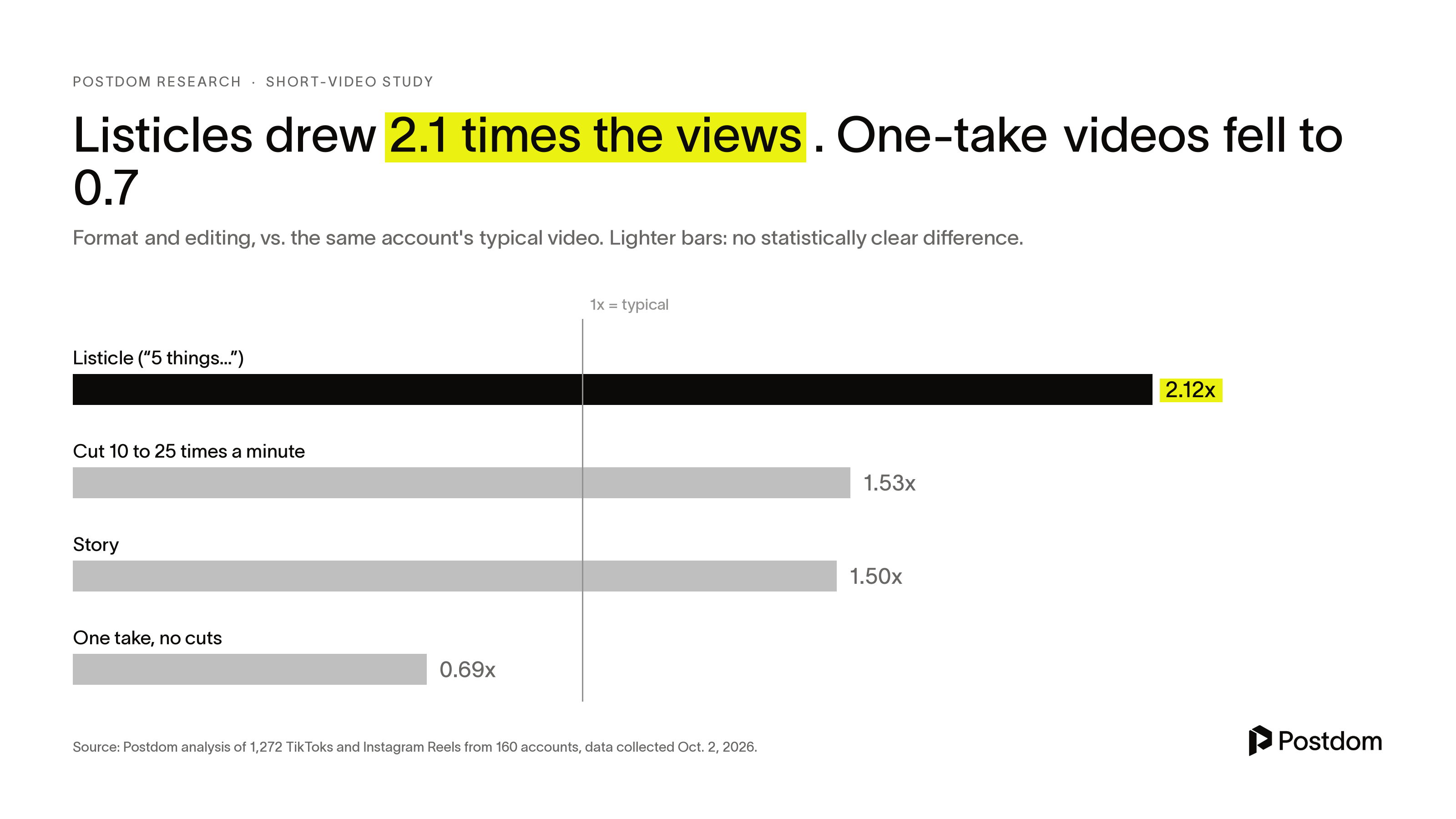
- 3 mistakes customers make. List videos drew 2.12 times typical views across the whole study, mostly on TikTok; on Reels alone they were about even.
- Your most-asked question, answered in under 30 seconds.
- Myth vs fact about your industry.
- What goes into the price. Break down a product or service line by line.
- Meet the team: one person, one task, one line about why they do it.
- How it's made or packed.
- A 10-second tour of your shop, studio or office.
- Reply to a comment with a reel that answers it.
- A tip a day series, numbered so people come back for the next one.
- New arrivals or this week's specials.
- POV: a customer moment everyone in your niche will recognize.
- Day 1 vs day 40 of a project, a client result or a new habit.
- 3 things near us: local spots your customers would like.
Need the first line? Our free Instagram hook generator writes hooks, and our list of TikTok ideas works for Reels too.
Using Reels to win customers? Our guide to how to use Instagram Reels for business covers it in full.
How often and when to post reels
Instagram doesn't publish a required frequency. Start with one reel a week, check which one gets watched, and make more of that kind before you post more often. Consistency beats volume you can't keep up.
For timing, our guide to the best time to post on Instagram compares the published studies by day and hour. Instagram's own scheduler lets public accounts schedule up to 25 posts a day, up to 30 days ahead, and our guide on how to schedule Instagram reels walks through it.
How to make reels on Instagram faster with Postdom
Paste your website and Postdom turns it into short-form videos in your brand: text over stock footage, your own clips or your website's photos, with music, voiceover and captions. On paid plans, an AI persona can present the video, so you get a person on screen without filming anyone. You approve, edit or reject each one, and Postdom learns from what you choose. Approved reels are scheduled to Instagram Reels, and the same video can go to TikTok, YouTube Shorts, Facebook and LinkedIn too. Before anything is sent, captions, video length, file type and size are checked against each platform's rules. For slideshows and single images as well as reels, use Postdom's AI Instagram post generator.
By default nothing publishes until you approve it. When 9 of your last 10 videos of one kind go through without edits, Postdom offers to post that kind without review, which saves you the daily check once it knows your taste. Our guide on how to schedule Instagram reels covers Instagram's own scheduler too.
How to make a reel people actually watch
Tap Create, tap REEL, record or add clips, tap Next, then Share. The buttons are the easy half.
Postdom studied 1,272 short videos, 1,120 TikToks and 152 Instagram Reels from 160 business, brand and creator accounts, and compared videos with and without each feature inside the same accounts. Here is what went with more views. You can read the full study of what makes a short video go viral.
Put the hook on screen as text
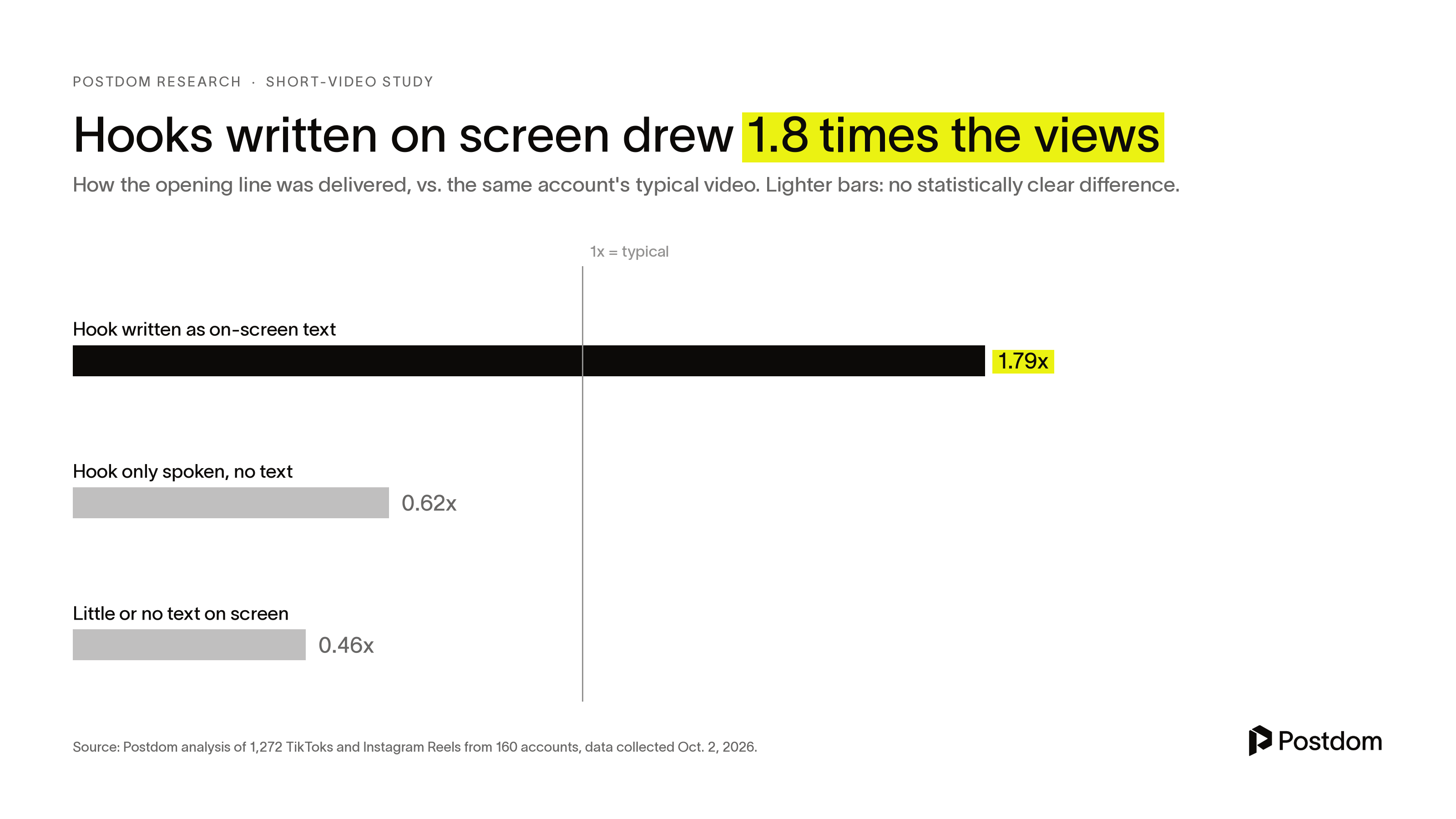
Videos whose opening line appeared as text on screen drew 1.79 times the views of the same account's other videos. Hooks that were only spoken drew 0.62 times. Videos with almost no text on screen did worse still, at 0.46 times.
One caveat for Instagram: on the 58 Reels in the sample with on-screen hooks, the lift was smaller, 1.16 times, and not statistically clear. Most of the signal came from TikTok. Text on screen still costs nothing to add.
Hook length didn't matter. Hooks of every length, from five words or fewer to more than 15, landed between 0.83 and 1.08 times typical views.
Open on a real place, not a product close-up
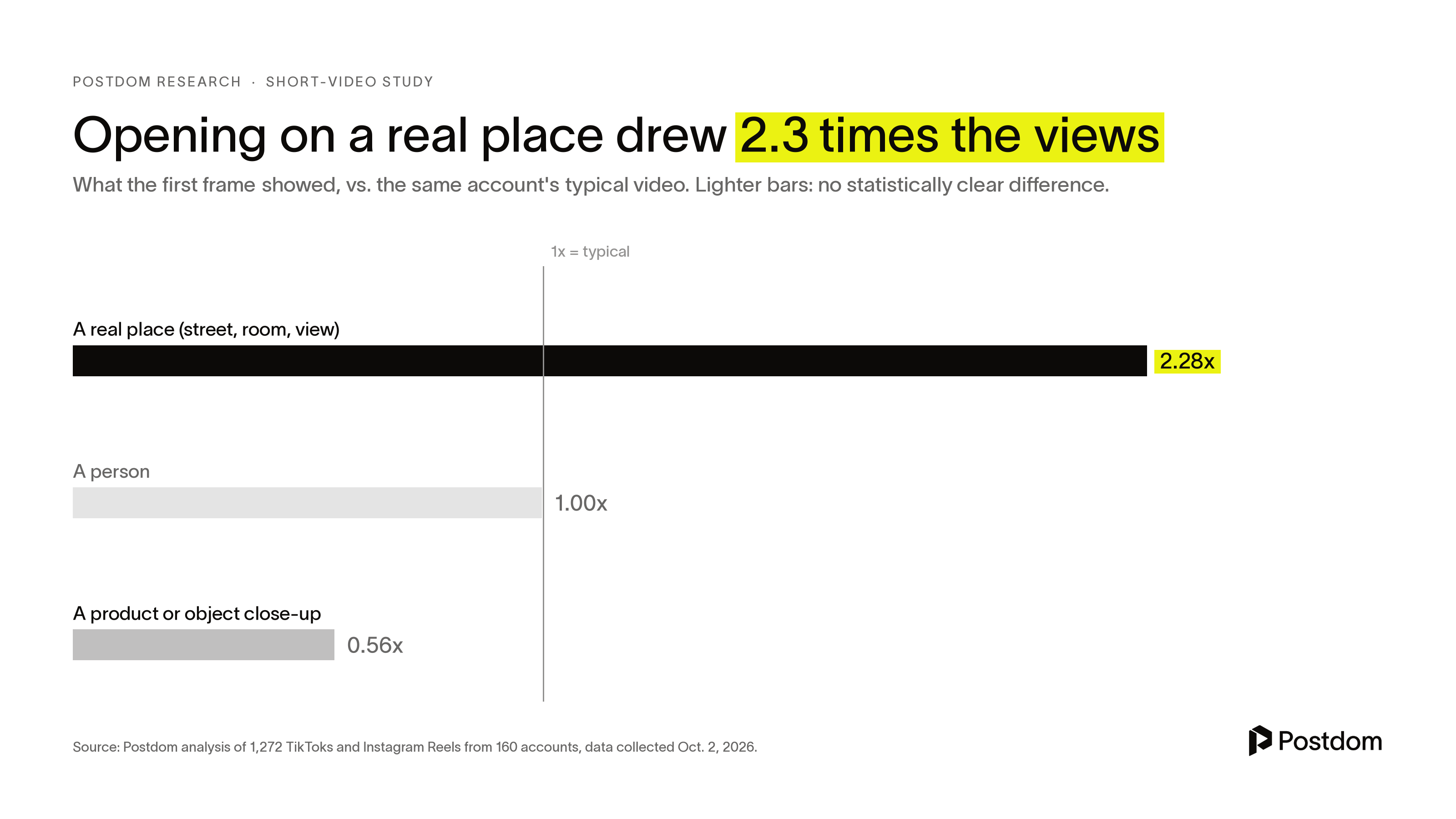
Videos that opened on a real place, such as a street, a shop floor or a room, drew 2.28 times the views of the same account's other videos. On the 19 Reels that did it, the figure was 1.74 times. Opening on a product close-up drew 0.56 times.
Cut every few seconds
Videos filmed in one take with no cuts drew 0.69 times typical views. Videos cut 10 to 25 times a minute, a new shot every 2.5 to 6 seconds, drew 1.53 times, and 1.16 times on Reels alone. List videos drew 2.12 times.
End on a recap, not "let me know below"
Three in 10 videos ended with a soft invite such as "let me know below". Those drew 39% fewer views than the same account's other videos. Videos that closed with a quick recap drew 52% more.
On the 54 Reels that ended with a soft invite, the drop was bigger, 0.55 times. A recap helped less on Reels than on TikTok, at 1.16 times.
Ask for a comment word, if you want comments
In our study of what people save and comment on, Reels whose caption asked viewers to comment a specific word, usually to get a guide or link, drew 5.1 comments per 100 likes, against 2.2 with no prompt. The Reels sample was small (17 and 46 Reels), and TikTok showed the same pattern.
Our guide to Instagram captions has 200+ captions to copy and more on which caption asks help and which cost views.
Most of these videos were TikToks. On the 152 Reels, the effects mostly pointed the same way but were smaller, and the Reels groups are too small to be statistically clear on their own. These are correlations from a sample that included each account's best and worst videos, so trust the direction more than the size.
Instagram reel not working? Quick fixes
- No music option: update the app. If it's still missing, your business account may only have the Meta Sound Collection.
- No Templates button: templates need music and at least 3 clips, and may not be available on every account.
- Blurry upload: export at 1080 x 1920 and at least 30 frames per second. Instagram's floor is 720 pixels.
- Black bars or cropping: your video isn't 9:16. Re-export it vertical.
- Caption won't post: you've used more than 5 hashtags.
- Music gone after downloading: Instagram drops library music from downloads. Keep your original file.
- Wrong cover: open the reel, tap the three dots, tap Edit, then Edit cover. If you don't see the option, Instagram's help center says covers can't be changed after upload on every account, so pick one before you share next time.
- No reach beyond followers: check the reel is under 3 minutes, and try a trial reel to test it on non-followers first.
FAQ
How long can an Instagram reel be?
Up to 20 minutes, recorded or uploaded. Instagram won't recommend reels over 3 minutes to new audiences, so keep reels you want strangers to find under 3 minutes.
How long should an Instagram reel be?
As long as the story needs, and under 3 minutes if you want Instagram to recommend it to people who don't follow you. Reels can run 20 minutes, but longer ones aren't recommended to new audiences. In our study, length made no reliable difference to views below that.
What size is an Instagram reel?
1080 x 1920 pixels, a 9:16 vertical video. Instagram accepts 1.91:1 to 9:16, at least 720 pixels and 30 frames per second. Keep text out of the top 14%, bottom 35% and 6% on each side.
How do I add music to an Instagram reel?
Tap Music in the tool menu on the left while recording, or tap Audio after you tap Next. Choose which part of the song plays. Some business accounts only get the Meta Sound Collection, which has over 14,000 royalty-free tracks.
How do I make reels on Instagram with photos and music?
Tap Create, then REEL, then your camera roll, and pick your photos in order. Tap Next, tap Audio and pick a song. Tap Edit video and drag the trimmers to set how long each photo stays on screen. Or tap Templates, pick one and drop your photos in.
How do I create a reel with multiple pictures?
Tap Create, then REEL, tap your camera roll and select the photos in the order you want them. Tap Next, add a song under Audio, then tap Edit video and drag the trimmers to set how long each photo stays on screen. A template does the timing for you: tap Templates, pick one and add your photos.
What do Instagrammers use to make reels?
Most use Instagram's own reel editor. Instagram's free Edits app adds a frame-by-frame timeline, green screen and exports with no watermark. Businesses that don't want to film use Postdom, which makes the reels from their website and posts the ones they approve.
What is the difference between an Instagram post and a reel?
A reel is a vertical video, up to 20 minutes, that shows in the Reels tab and can be recommended to people who don't follow you. A post is a photo, video or carousel in the feed. Photo posts and carousels with music can also show up in Reels.
How do you start a reel?
Tap Create at the bottom of your Feed, then tap REEL. For the video itself, start with the hook written on screen in the first second, ideally over a real place rather than a product close-up.
How many hashtags can I use on a reel?
Up to 5. Instagram began cutting the limit from 30 to 5 in December 2025, and a caption with more than 5 won't post.
Can I schedule an Instagram reel?
Yes, if your account is public. Before you share, tap More options, turn on Schedule this reel, choose a date and time, and tap Schedule. Instagram allows up to 25 scheduled posts a day, up to 30 days ahead. Postdom also schedules reels, and by default you approve each one first.
Can I change my reel's cover?
Usually, yes. Open the reel, tap the three dots, tap Edit, then Edit cover. Menus vary by account, and Instagram's help center still says covers can't be changed after upload, so pick a good one before you share: on the last screen, tap Edit cover to choose a frame or add an image.
Can I edit a reel after posting?
Partly. Open the reel, tap the three dots, tap Manage, then Edit to change things like the caption and location. Instagram's help center doesn't offer a way to recut the video itself, so to change clips, on-screen text or music, delete the reel and post it again.
What are trial reels?
Trial reels are shown to people who don't follow you first, and stay off your profile unless you share them to everyone. Insights appear within 24 hours, and you can turn on Share to everyone automatically so a trial that does well goes to your followers too. You need a public account with at least 200 followers (professional) or 1,000 (personal).
How do I add a voiceover to a reel?
After you record or pick a clip, tap Edit video, tap Voiceover, then tap or hold Record. You can record more than one voiceover clip and slide each one to where it should start.
Why are my reels not getting views?
In our study of 1,272 short videos, the weakest ones had little or no text on screen, opened on a product close-up, were shot in one take, or ended with "let me know below". On Reels, the soft-invite ending went with 45% fewer views. Also check the reel is under 3 minutes and its text sits inside the safe zone.
Can Postdom make Instagram reels for me?
Yes. Paste your website and Postdom makes short videos in your brand, with the hook on screen, music, voiceover and captions, and an AI persona on paid plans. It posts the ones you approve to Instagram Reels. Starter is $39 a month for 30 posts, with a 7-day free trial.
Next step
Get a slideshow or short video made for your business.
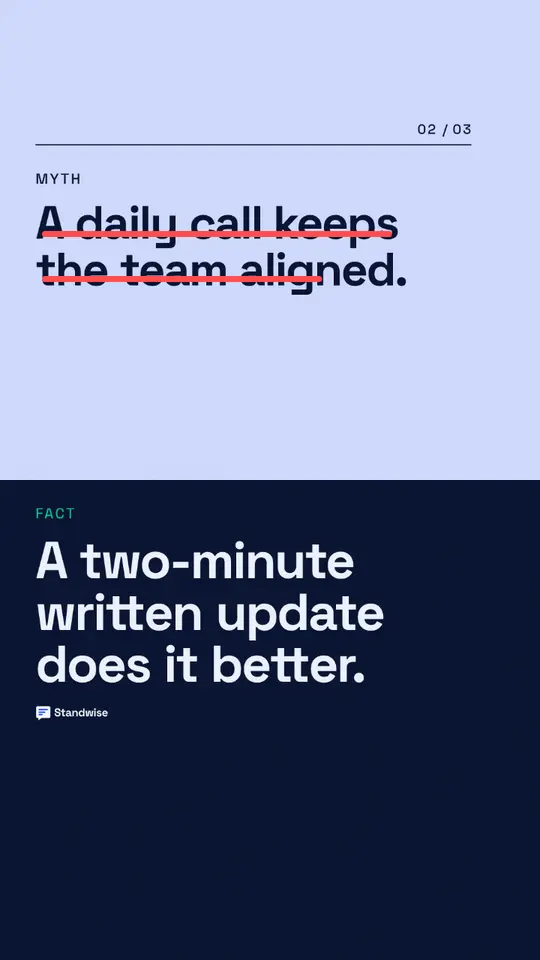
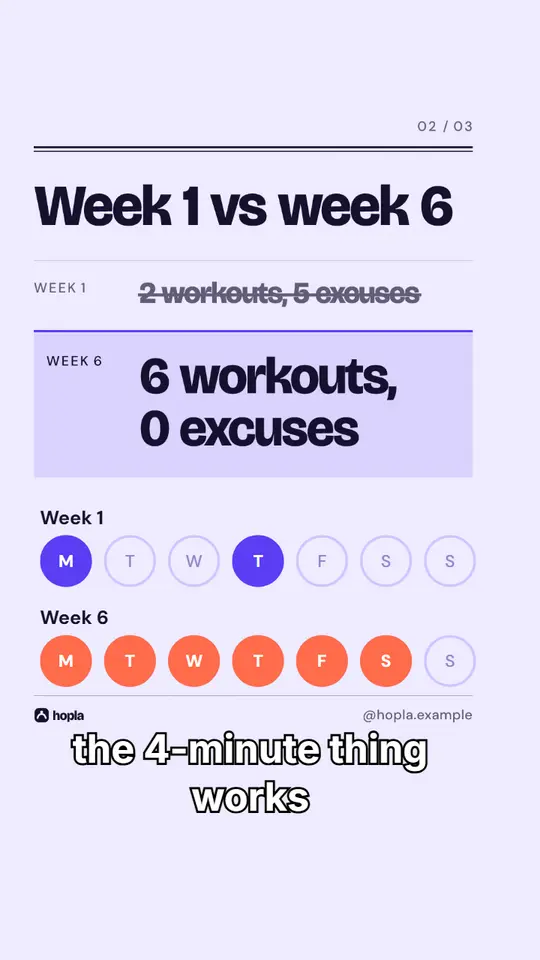
Made with Postdom for example brands.
Related
All posts