Selfie-style videos
A selfie clip of an AI-made person from Postdom's shared library, with your hook and message as native text boxes. The person never speaks.

UGC video
Add your website, @handle or business name and this AI UGC video generator makes UGC-style short videos: phone-style selfie clips of AI-made people, with your message as text on screen. Approve the videos you like, and Postdom posts them to TikTok, Instagram and more.
Updated
Most open on a selfie clip of an AI-made person, who never speaks, with the message as text on screen. Each is labelled with its style and its trade.
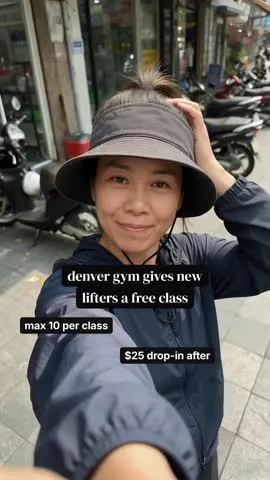
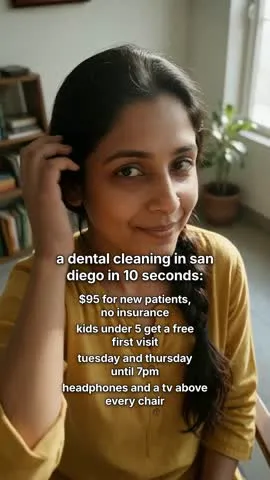

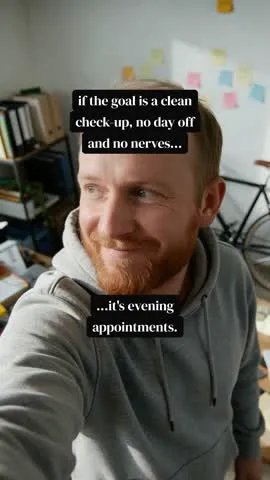



Real Postdom posts for sample brands, which aren't real businesses. Clips and photos are licensed stock or made with AI, as in the product.
An AI UGC video generator is a tool that makes short videos in the casual, shot-on-a-phone style of user-generated content, without filming or hiring creators.
Postdom is an AI social media manager for small businesses: it turns your website into ready-to-post videos, slideshows and single images in your brand, and posts the ones you approve to TikTok, Instagram and more.
Postdom's UGC-style videos open on a selfie clip of an AI-made person from its shared library, with your hook and message as text on screen and music under it. The people never speak, so there is no talking to camera.
Short, casual videos in the style people post from their phones. Postdom makes them from what your website already says: what you sell, who it's for and why it's worth it.
A selfie clip of an AI-made person from Postdom's shared library, with your hook and message as native text boxes. The person never speaks.
Real clips and photos made for your brand, with native text boxes, music and optional voiceover.
Your logo, colours, fonts and tone, read from your website, so every video sounds like you.
Postdom is a UGC video maker for businesses without creators or time to film. Instead of briefing a person and waiting for footage, you paste your website, and Postdom writes the hook, picks the selfie clip and puts your message on screen in your brand.
You keep control: edit any video before you approve it, skip the ones that miss, and nothing posts until you approve it.
UGC means user-generated content: videos that feel made by a person, not a studio. AI UGC gives you that look without filming or hiring creators.
In Postdom, the person in a UGC-style video is AI-made and comes from a shared library of silent selfie clips. They never speak: your hook and message appear on screen as native text boxes. The AI label is off by default, and you can turn it on in Settings.
In Postdom's study of 2,138 TikTok posts, product brands' videos with their usual person on screen drew 2.51x their usual views, and videos with no person drew 0.42x. A selfie clip puts a person on screen even when nobody has time to film. The study measured real people, so it is not a promise of the same result.
UGC ads are short videos in a casual, phone-shot style that brands use as ad creative. Postdom makes organic videos in that style, with the message as text on screen rather than spoken to camera.
Postdom doesn't run or buy ads. It makes the videos and posts the ones you approve to your own accounts.
Hook text on screen matters. In Postdom's study of 1,272 TikToks and Reels from 160 accounts, on-screen hook text went with 1.79x an account's usual views, and spoken-only hooks went with 0.62x. Postdom puts the hook on screen as a native text box.
Starter, Growth and Scale start with a 7-day free trial; the table shows what Starter includes. A post can be a UGC-style video, a slideshow or a single image.
After the trial, Starter is $39 a month for 30 posts, about $1.30 a post, and you can turn the watermark off. See pricing for every plan.
| What you get | Starter |
|---|---|
| Price a month | $39 |
| Posts a month | 30 |
| Connected accounts, any platform | 3 |
| Free trial | 7 days free, up to 10 posts |
| Postdom watermark | You can turn it off |
| Formats | UGC-style videos, other short videos, slideshows, single images |
Postdom reads it and builds a brand preview from what it finds.
Your For You feed fills with finished UGC-style videos and other posts in formats that already work on TikTok and Instagram.
Nothing posts until you approve it. At your first approval, connect your accounts, and Postdom schedules what you approve in your time zone.
Every approve, edit and skip shapes the next videos, and so does how each post performs. Once 9 of your last 10 posts of one type are approved without edits, Postdom offers to post that type without review.
Postdom posts to nine platforms: TikTok, Instagram, YouTube, Facebook, X, LinkedIn, Bluesky, Snapchat and Threads. The videos it makes go to TikTok, Instagram, YouTube, Facebook and LinkedIn, and approved videos go out at 9am and 7pm in your time zone by default.
The AI label is off by default, and you can turn it on in Settings.
Postdom makes and posts videos. It doesn't make talking-to-camera videos today, book real creators, buy ad space or manage ad campaigns, and it isn't an editor you build videos in by hand.
You pick, approve and nudge. If a video isn't right, edit it or skip it, and the next ones get closer.
Postdom starts with a 7-day free trial on Starter, Growth and Scale. It makes UGC-style videos, slideshows and single images from your website, so you can judge them before you pay. Cancel anytime.
No. Postdom uses selfie clips of AI-made people from its shared library, plus real clips and photos with native text boxes.
No. The people in Postdom's UGC-style videos are AI-made and never speak. Your message appears as text on screen. Postdom does not make talking-to-camera videos today.
Postdom posts to nine platforms: TikTok, Instagram Reels, YouTube Shorts, LinkedIn, Facebook Reels, X, Snapchat Stories, Threads and Bluesky. Videos go to TikTok, Instagram, YouTube, Facebook and LinkedIn.
Yes. Edit any post before you approve it, or skip it. Postdom learns from every approve, edit and skip, so the next videos get closer to what you want.
Canva and CapCut are editors: you build each video yourself, from a template or your own footage. Postdom starts from your website and makes the finished video for you, then posts the ones you approve. If you like building by hand, an editor suits you. If you want videos made for you, Postdom does that.
Postdom doesn't run ads. It posts the videos you approve to your own accounts. Once a video is live, you can promote it with the platform's own ad tools, like any other post.
Paste your website and get your first UGC-style video today.
Starter, Growth and Scale start with 7 days free. Cancel anytime.