Client Workspaces · Human Review · Agent Publishing
Social Media Scheduler for Agencies, One Client Workspace at a Time
Postdom is a social media scheduler for agencies that want AI agents to handle publishing while people keep control. Separate each client’s accounts, brief and team access into a workspace, choose when a human must approve, and follow each destination’s publishing result. Start with one client. Postdom can write posts from that client’s website, or publish the finished work your team makes; keep client-ready reporting in your existing workflow.
Reviewers sign in to their client workspace. Subscriptions and usage are per workspace—not an all-client bundle.
Delegate Publishing, Keep the Client Decision
You Bring the Finished Work
Your team produces and edits the video, agrees the caption and gets the client’s sign-off. Postdom publishes supplied videos to TikTok, Instagram Reels, YouTube Shorts, LinkedIn, Facebook Reels, X, Snapchat Stories, Threads and Bluesky.
The Agent Follows the Publishing Request
It reads the client’s brief, submits authorized work and checks the returned post ID. Your reviewer controls approvals and policy, and decides what happens when the work needs attention.
Keep your creative review, project management and client reporting tools where they already work. Start with a client whose finished-video workflow and destination settings fit the publishing path you choose.
Why Choose an Agent-Controlled Publishing Workflow?
Postdom is worth evaluating when your agency already uses an AI agent or is building a repeatable publishing process. The benefit to test is delegated execution with clear human decisions—not a lower-cost bundle of calendars and client reports.
Keep a client’s publishing access separate. Authorize the agent for that workspace and verify its returned accounts before it submits.
Review the request that will be sent. In Post review mode, a human checks the content, targets and timing before provider handoff. The agent cannot approve itself.
Know which destinations need attention. Follow the same post ID and preserve each destination’s success or error instead of calling a partly published post complete.
If your main requirement is a no-login client portal or ready-made branded reports, keep those tools.
What Does Postdom Cost for an Agency?
Price each client workspace for the accounts, people and monthly publishing volume it needs. A workspace is the billing unit; it is not a free container inside one agency-wide subscription.
Monthly Prices · USD · Allowances Per Workspace
Plan
Price
Accounts
Publishes / Month
Seats
Starter
$39/mo
3
100
2
Growth
$99/mo
10
400
10
Scale
$229/mo
20
1,500
No seat cap
Pro
$399/mo
30
1,500
No seat cap
USD per workspace per month with monthly billing. Paid self-serve plans charge $0.20 per successful destination-publish above that workspace’s allowance. One post successfully published to three destinations uses three units. Free blocks at its cap. Examples exclude taxes, publishing overages, external model charges and Postdom Chat AI-action overage. Your own agent does not spend Postdom Chat’s AI allowance. Annual billing and Platform terms differ.
Seats include members and pending invitations. Separate people need separate seats. Free’s one-seat allowance blocks adding another person when occupied. Existing members remain after a downgrade; the lower limit blocks new invitations.
Test the review workflow in one workspace before budgeting for several clients.
Worked Examples: Three Client Workspaces
Three Smaller Client Workspaces
$177 / month
1 Growth × $99 + 2 Starter × $39. The paid Growth workspace gives its owner capacity to create three workspaces in total. Each Starter workspace has two seats: for example, one agency owner who also publishes and one client reviewer. Three distinct people need a higher seat allowance. Account and publish allowances remain separate.
Three Growth Client Workspaces
$297 / month
3 Growth × $99. Each workspace separately includes 10 connected accounts, 400 successful destination-publishes per month and 10 seats. These allowances are not pooled.
Workspace creation is a separate owner-level allowance: Free and Starter permit creation up to 1 owned workspace; an eligible paid Growth subscription raises the creation ceiling to 3; Scale to 25. The best qualifying plan among your owned workspaces sets that ceiling. Existing workspaces are retained after a downgrade; the cap blocks additional creation. Creating a workspace does not include another paid subscription.
How This Social Media Scheduler for Agencies Handles Client Work
Choose the Client Workspace
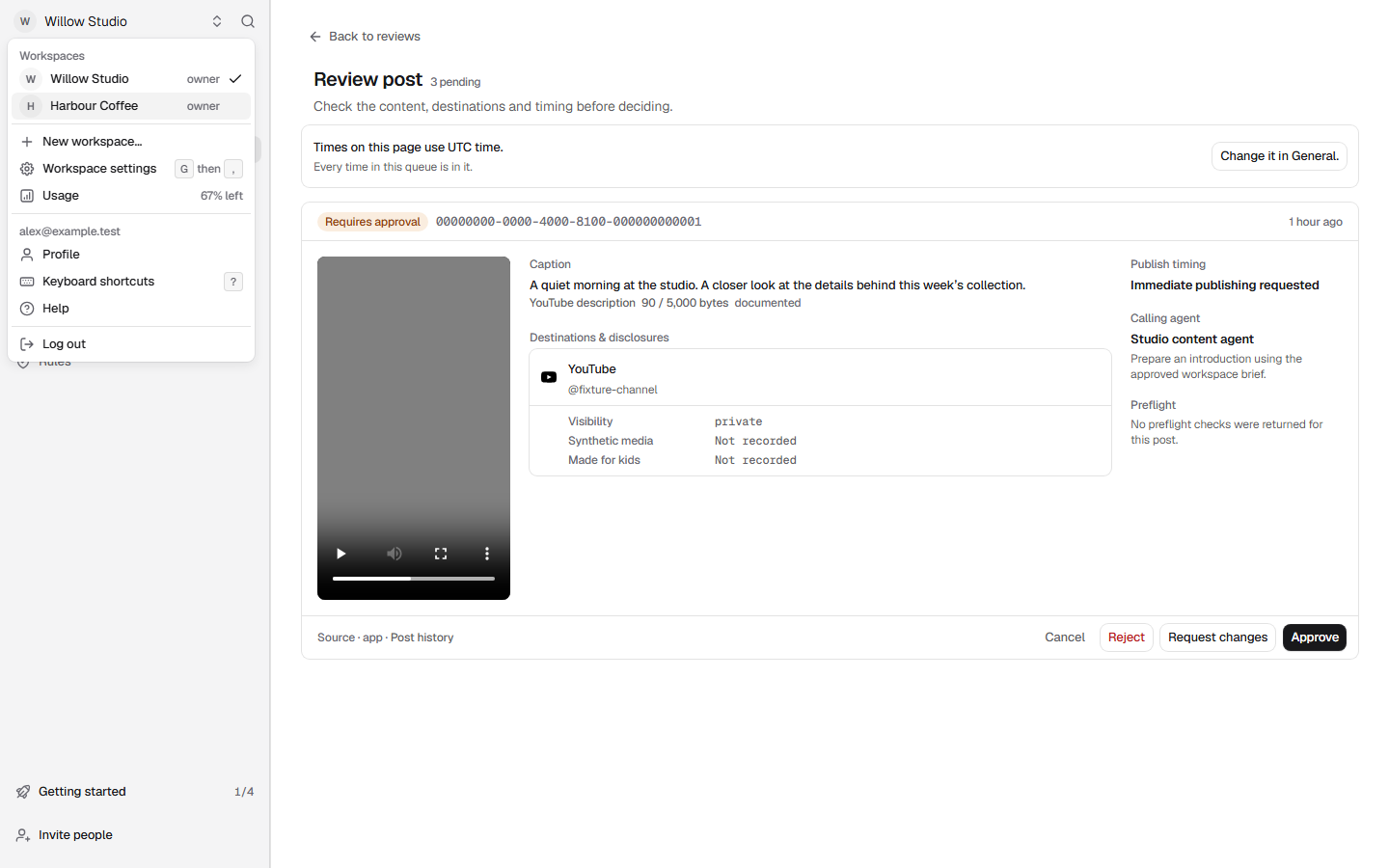
Open New workspace… from the workspace menu, Cmd+K, or the switcher to create a client workspace, or open the workspace menu to move to an existing one. Cmd+K marks the current workspace Current. Keep that client’s connected accounts, brief, agent access and billing there; switching the dashboard does not switch a separately configured agent connection.
Connect the Right People and Accounts
Open Connected apps to authorize the agent for this workspace. Separately, have an authorized human connect the client’s profiles in Social accounts. Owners, admins and members can invite collaborators from Invite people; only owners and admins can invite an admin. Choose their role deliberately: a member can change every approval and policy control, and only owners and admins can change the plan and billing.
Save the Brief and Name the Reviewer
In Workspace settings, open Rules and edit How Postdom writes with the client’s voice, approved claims and things to avoid. Rules also sets the enforced posts per day and quiet hours. The brief guides the agent but is not an approval. Name the person who will review the actual video, caption, audience and planned time.
Choose When a Human Must Approve
For review of every agent post, set that account to L1 Post review before submission. Do not assume it is the default. Choose plan review only when a human is ready to approve the accounts, time window and scope; bounded autonomy uses the account’s saved policy instead.
Submit the Finished Video, Then Follow Its ID
Give the agent an accepted video URL or already-stored media handle, the selected account IDs, the reviewed caption and a future UTC time. Keep the returned post ID. If review is required, an authorized human checks the exact request in Review. Then use Schedule and the run result to distinguish waiting, publishing and published.
Switch client workspaces from the Postdom menu, then verify the client’s accounts and agent connection. Genuine interface with fictional test workspaces, captured 21 September 2026.
Client separation is a habit as well as an access boundary. A workspace credential scopes API requests; it does not clear the agent’s memory or choose the correct connection. Start a separate task for each client and verify the workspace, brief and accounts before submitting.
Agree who is responsible for client sign-off and who records the decision in Postdom. They may be the same person, but an email approval and a Postdom approval are different steps.
Mode
What the human decides
L0 · Manual
The agent creates an unscheduled post. A human chooses whether and when it publishes.
L1 · Post review
Each agent post waits for exact human approval before provider handoff.
L2 · Plan review
Posts flow only inside one approved plan covering the accounts, UTC window, and post maximum.
L3 · Bounded autonomy
Posts flow only inside the account's saved daily cap, visibility allowlist, and quiet hours.
For a client who expects to sign off every post, use L1 Post review before submission. Do not assume new accounts start there. An agent cannot approve its own work or increase its authority. Invite reviewers with an appropriate role. Admin access is not a narrow client-review permission.
Workspace owners, admins and members can approve posts and plans. Clients need their own signed-in workspace membership; there is no no-login guest approval portal, named-reviewer assignment or sequential approval chain in this verified workflow.
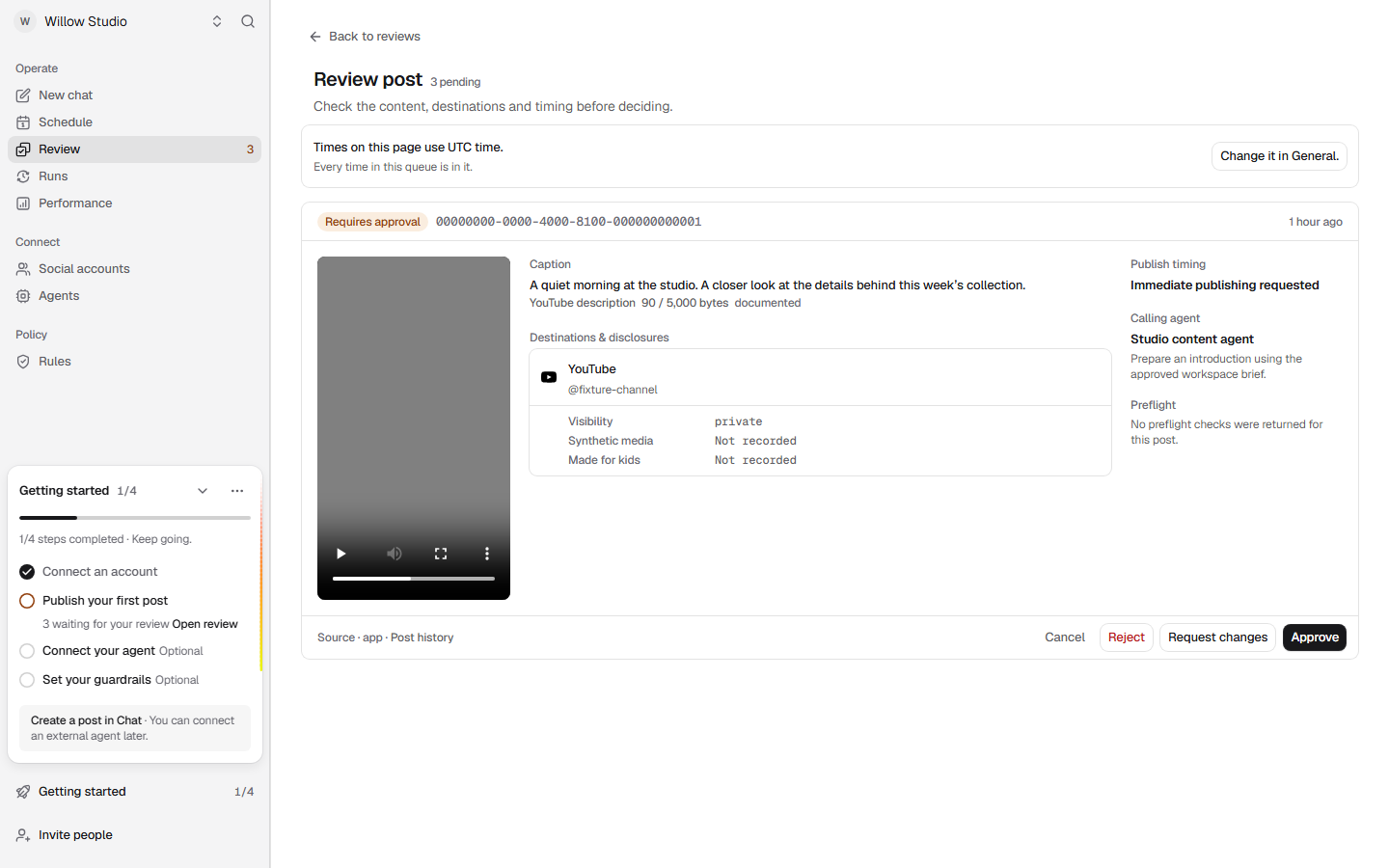
Social media scheduler for agencies demonstration: review the caption, destination, visibility and timing before deciding. Actual Postdom interface with synthetic local test data, captured 21 September 2026.
Actual product interface, not a customer workspace. Willow Studio and its post are synthetic test data; the gray video is a test asset. No approval or publication was completed. This fixture requests immediate publishing, while your client workflow can specify a future time. Not recorded disclosure fields require a human check, not an assumption.
When a reviewer requests changes, feedback does not automatically revise the post. Prepare corrected content as a new post, submit it under the intended review mode and check that the replacement is awaiting approval. Keep the author and reviewer coordinated. See the Full Approval and Correction Workflow.
A Client Handoff You Can Use
Imagine Harbor, a fictional client, has approved a launch video. Your agency lead opens Harbor’s workspace, confirms its Instagram account and current brief, and asks the agent to submit the reviewed video for the agreed UTC time. The account is set to Post review.
The returned post needs approval. The lead opens Review, checks the video, caption, audience and disclosures, then records the decision. In Schedule, they check the saved time and status. After handoff, the agent reads the same ID and reports the actual Instagram result, not just “submitted.” If anything fails, the lead owns the next decision.
Before moving to Cedar, another fictional client, stop Harbor’s task. Choose Cedar’s connection and read Cedar’s brief and accounts again. Switching the browser workspace alone is not enough.
Confirm the client workspace and the connection authorized for it.
Read its current brief and select its returned account IDs.
Preview the finished video and confirm caption, audience and disclosures.
Record the human reviewer, review mode and intended UTC time.
Keep the post ID, each destination outcome and any unresolved action.
Open a copyable client handoff note
This is a record for your team, not a request payload or a completed result. Fill it from the actual client workspace.
Client / workspace: [name and verified workspace reference]
Agent connection: [connection authorized for this workspace; never paste a key]
Accounts: [returned providerAccountIds and destinations]
Brief: [current version read from this workspace]
Finished video: [accepted URL or stored handle reviewed by a human]
Caption, audience and disclosures: [exact reviewed settings]
Reviewer and authority: [person, account review mode, approved plan if required]
Schedule: [future UTC time; record the client’s local time and date-specific offset separately]
Post ID: [returned after submission; do not invent one]
Outcome: [each destination’s exact result and error, if any]
Next action / owner: [review, wait, reconcile or a human recovery decision]
Check the Agent’s Settings Before a Client Launch
Test whether the publishing path supports the client’s required format, audience and disclosures with one client before connecting the rest. These implementation notes describe convenience helpers, not every capability of the current HTTP API.
Inspect Helper Settings and the Technical Handoff
Connecting an agent authorizes workspace access. It does not approve a particular post or guarantee the audience your client expects. The video convenience helpers apply these destination defaults; match them to your installed version and chosen surface. These are the published MCP 0.5.0 defaults; the published Node SDK 0.1.0 still sends TikTok and YouTube as private with AI disclosure on:
TikTok: public to everyone by default (tiktok_privacy can choose another audience), no AI label, comments/Duets/Stitches off, with preview and express-consent assertions. A real human preview and consent must happen first.
Instagram Reels: AI-generated disclosure off, with no private audience override. Check the account audience.
YouTube Shorts: public, synthetic-media disclosure off, and not made for kids. Those assertions must fit the actual video.
Facebook Reels: defaults to a Reel when no surface override is supplied. Newer clients and the current API also expose named surfaces; check the version and chosen path. This helper supplies no audience control, and Facebook Reels carry no AI-disclosure field on this path - unlike Instagram, where the same format does.
X: no settings are sent at all. X exposes no visibility field and no AI-disclosure field on the publishing path, so nothing is chosen for the client and nothing is disclosed.
Snapchat: no settings are sent; the current transport publishes to Stories and does not offer Spotlight, and the account needs a Public Profile before it can publish at all - a regular account cannot. The endpoint exposes a save-to-profile option Postdom does not send.
LinkedIn: no settings are sent at all. Postdom’s publishing provider chooses the required LinkedIn visibility value and does not expose it through this helper, so there is no audience control here to check and none to report. LinkedIn exposes no AI-disclosure field, so no disclosure accompanies the post - treat a client video needing one as unsuitable for this path.
Threads: no settings are sent, and Meta’s posting endpoint exposes no visibility field and no AI-disclosure field. The audience is decided by whether the client’s Threads profile is public or private, which the post inherits - check the profile rather than looking for a control here.
Bluesky: no settings are sent, and every post is public - the post record carries no visibility field, so there is nothing to choose rather than something Postdom declines to send. Connecting uses an app password the client generates in Bluesky settings, not their account password.
Do not use these helpers for a public client launch while assuming they can change those settings. Stop if a disclosure is false or a required control is unavailable. The platform-specific scheduling guides explain the supported paths: TikTok, Instagram Reels and YouTube Shorts.
Open the agency agent brief and connection options
Use the supported connection setup first. In Agents, authorize the selected workspace through OAuth, or have an owner/admin create a workspace key for a custom agent. Store keys privately, never in a prompt or source control. Revoke obsolete access when a client engagement ends.
Work only in the explicitly selected client workspace and configured connection. Do not reveal credentials.
Read get_workspace_status, list_accounts and get_brief. Confirm the workspace reference, current brief and providerAccountIds with me. Stop on a mismatch, pause, locked connection or unclear policy. Do not reuse another client’s context or IDs.
Use only the finished video I supply. Show me the video, caption, selected accounts, audience/disclosure settings and future UTC time before submission. Do not generate replacement media.
Use a released helper only if its actual settings fit. With MCP 0.5.0, TikTok is public to everyone by default (tiktok_privacy can choose another audience) with preview/consent assertions and no AI label, Instagram sends no AI disclosure and has no private override, and YouTube is public, not-made-for-kids, with synthetic-media disclosure off. LinkedIn receives no settings: Postdom’s publishing provider chooses the required visibility value, which this helper does not expose, and it carries no AI disclosure. Treat LinkedIn as a destination where audience and disclosure are unavailable controls, and stop rather than assume them. Facebook is sent the default Reel setting when no surface override is supplied, and carries no AI disclosure on the publishing path. X and Snapchat are sent no destination settings; the current Snapchat transport publishes to Stories and does not offer Spotlight, and neither carries an AI disclosure; Snapchat also requires a Public Profile on the account, so a client account without one cannot publish. Threads is sent nothing either and carries no AI disclosure; a Threads profile being public or private is what decides the audience, and the post inherits it from the account. Bluesky is sent nothing either, and there it is because the post record has no visibility field at all - every Bluesky post is public, which is a fact about Bluesky rather than about Postdom. Treat all five the same way as LinkedIn: audience and disclosure are not controls you have here. Stop if any assertion is wrong or a required control is unavailable.
I decide approval mode and policy. Submit only after my review and permission; include plan_id only for work inside a human-approved plan. Never approve yourself or widen authority.
Save the returned post ID and read get_publish for that same ID. Stop for required human review. Wait for scheduled/publishing only within an agreed waiting budget, then return the ID if unresolved. Preserve each destination result. Reconcile an uncertain submission before retrying; do not replay successful destinations.
Before another client, stop this task and verify that client’s connection, accounts and brief again.
The brief is guidance, not a substitute for enforced Policy or a human approval. Use a stable idempotency key for the same intended request; if its outcome is uncertain, reconcile it before retrying. An accepted request is not a completed publication.
Return the post ID, destination, current state and error to the named owner. Do not hide a missed slot behind a new submission.
What happened
Next action
A review is waitingrequires_approval
Send the reviewer the post ID and open Review in the correct workspace. A chat message saying ‘approved’ does not record a Postdom approval. Upcoming can still include posts waiting for review.
The reviewer needs a changechanges_requested / rejected
Read the feedback and return it to the owner. Do not submit the same rejected work under a new ID. Agree the next request with the reviewer; do not invent an in-place revision action.
The post has no live slotdraft / missed_approval / missed_schedule
A human can choose a new UTC time with Schedule or deliberately choose Publish now for these states. Do not publish time-sensitive client content late without a decision.
The request is still in progressscheduled / publishing
Read the same post ID again later. Do not create a replacement while the original is waiting or being processed. A scheduled handoff time is not a guarantee of visible publication at that instant.
Some or all publishing failedpartial / failed
Read each destination result and preserve its error. If some succeeded, keep those results; do not replay the entire post. Have the owner decide what to fix before another attempt.
Do not guess whether to retryPolicy stop / uncertain submission
If policy stopped work before submission, resolve it and obtain fresh authorization. If the result is unclear, the provider may have received it: reconcile the original request before retrying.
Close the Loop With Evidence the Client Can Understand
Separate “published” from “performed well.” Save each destination outcome, then read available performance data for that client. A missing, delayed or unsupported metric is not zero. Keep its availability and reason when you prepare the client report; do not combine unlike platform metrics into an invented total.
Use the current brief, post results and available measurements to propose the next plan. Your team still supplies the interpretation and the client-facing report. These records do not prove revenue attribution or client growth. Read how measurement availability works.
Before quoting the engagement, check current workspace pricing and the client-facing features you need. Workspace switching does not imply a consolidated portfolio report or no-login client portal. Confirm branding and custom-domain access before including them in a proposal.
Agency Questions
How much does Postdom cost for three agency clients?
One paid Growth workspace plus two Starter workspaces costs $177 per month on monthly billing, before taxes and overages. Three Growth workspaces cost $297. Each workspace has its own subscription and allowances. An eligible paid Growth workspace raises its owner’s creation ceiling to three workspaces total; it does not bundle the other subscriptions.
Is Postdom a fit if we need a client approval portal and branded reports?
Not as a complete replacement for those tools. This workflow requires signed-in workspace reviewers, and your team prepares the client-facing report. Postdom is a fit to evaluate when agent-driven publishing, separate client workspaces and human authority are the priority. Keep your existing guest approval and reporting tools if those are requirements.
Can one agency manage several clients in Postdom?
Yes. Use a separate workspace and agent connection for each client, with separate subscriptions and usage allowances. Free or Starter permits creation up to one owned workspace; eligible paid Growth raises that creation ceiling to three and Scale to 25. Existing workspaces remain after downgrade. Switching the browser workspace does not reconfigure an agent connection or produce a combined client report.
Does a workspace prevent an AI agent from mixing client instructions?
The credential scopes API access to its workspace. It does not erase the model’s conversation or choose the right connection for you. Before changing clients, confirm the connection, current brief and returned account IDs. Keep separate client tasks and never carry another client’s assets or approvals into the request.
Can the client approve a post from a shared link without signing in?
No. This workflow uses an authenticated workspace reviewer, not a no-login client approval portal. Owners, admins and members can approve posts and plans. A client reviewer needs a workspace seat. Members and pending invitations count toward the seat allowance for new invitations. Existing members are retained after a downgrade. Do not grant broad admin access merely to imitate a client-only approval link.
Does every post wait for approval?
Not in every mode. L1 Post review requires the exact human post decision. L0 leaves publishing to a human; L2 operates inside a human-approved plan; L3 operates inside saved account policy. A human chooses the mode, and the agent cannot promote itself. Set the desired mode before submission.
Does Postdom make the videos or deliver branded client reports?
Postdom can write posts and short videos from each client’s website for a person to approve, and it publishes finished videos you supply to TikTok, Instagram Reels, YouTube Shorts, LinkedIn, Facebook Reels, X, Snapchat Stories, Threads and Bluesky. It does not make branded client reports, so keep reporting in your existing workflow. Use the returned outcomes and available measurements as evidence; unavailable data is not zero or proof of poor performance.
What should we check before quoting a client?
Check current workspace pricing, usage and the exact client-facing features you need. A separate workspace does not imply a bundled agency plan, consolidated billing, branded reports or a no-login approval portal. Confirm branding and custom-domain access before including them in a proposal.
Talk to us
Not Sure Where to Start? Let's Talk.
Tell us what your agency publishes for clients today and we will show you what Postdom does and does not do, against your own workflow rather than a demo account.
TikTok, Instagram Reels, YouTube Shorts, LinkedIn, Facebook Reels, X, Snapchat Stories, Threads and Bluesky — the destinations Postdom publishes to today, and no others.
Free for 7 days on a paid plan — you can start without talking to anyone, and this offer is for when you would rather not.
Human approval built in — an agent cannot approve its own work or widen its own authority.