Service and price pages
What you sell and what it costs: the facts most videos are built on.

Your website in, short videos out
Paste a link to your website and this URL to video converter reads it, writes short vertical videos about what you sell, and posts the ones you approve to TikTok, Instagram Reels, YouTube Shorts, Facebook Reels and LinkedIn.
A URL to video converter takes a web address and makes a video from what the page says. Postdom reads your whole site, not one page, so it keeps finding new videos to make.
Postdom is an AI social media manager for small businesses: it turns your website into ready-to-post videos, slideshows and single images in your brand, and posts the ones you approve to TikTok, Instagram and more.
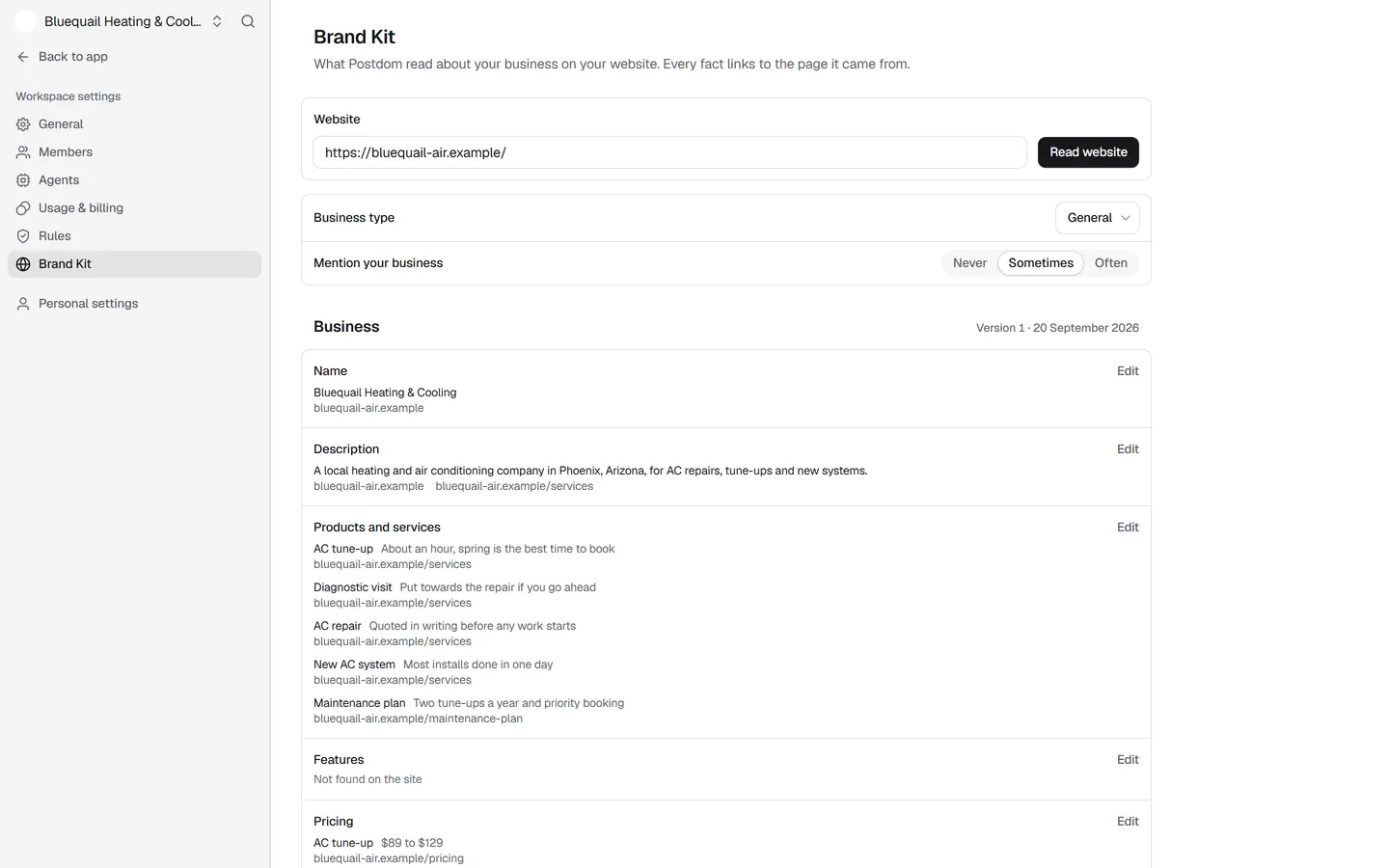
Postdom reads your main pages and builds a Brand Kit: what you do, your services and prices, and where you are. Every fact links to the page it came from, and you can edit any of them.
A price people ask about, a service explained, a common mistake, a seasonal reminder.
A spoken-style hook, text on screen, clips that fit each line and music, in one of 47 styles, with a caption written for each platform.
Approved videos are scheduled inside your posting rules. They publish to TikTok, Instagram Reels, YouTube Shorts, Facebook Reels and LinkedIn.
Each of these started as a sample business website: a bakery, a dentist, a realtor, a gym, a hotel, a florist and an HVAC firm. Postdom read the site and made the video; the label says the style and the trade.








Real Postdom posts for sample brands, which aren't real businesses. Clips and photos are licensed stock or made with AI, as in the product.
Plans: Free, then Starter $39, Growth $99, Scale $229 and Pro $399 a month. Each video counts as one post, and every plan can make videos.
Starter is $39 a month for 30 posts. Free is 1 post a month on 2 accounts, with a small Postdom watermark. Compare every plan.
Most link to video converters save a video that already sits behind a link, such as a post on a video app. Postdom does not download videos. It makes new ones from what your own website says.
If you need a copy of someone else's video, a downloader is the tool for that. If you want new videos about your business every week, paste your site here.
What you sell and what it costs: the facts most videos are built on.
Who you are, where you are and what makes you different.
The questions customers ask, each one a short video waiting to be made.
Postdom can turn an article into a short video and say which article it came from.
Most URL to video tools take one page, such as a product or a blog post, and summarise it into one video. That works well for a one-off launch or an article you want to promote.
Postdom works the other way. It reads the whole site once, then keeps finding new angles from it, so you get a steady run of videos rather than one.
Good for a launch, a sale or a new article. You pick the page and the message.
Good for a business that wants to post several times a week. The site supplies the facts, and the tool supplies the ideas.
Each of these is a vertical video, sized for the short-video feeds. You choose which styles are in your mix, and Postdom does not make the same kind twice in a row.
Plain on-screen text in the styles that perform well on each app, over a fitting clip. More videos use these than any other kind.
One real-life clip with the hook in the middle of the frame, and the story told in the caption underneath.
A reaction clip over a scene that fits your business, with one line of text. Light, and quick to watch.
One block of words over one clip: a hook, a turn, a short list and a soft ending. Easy to read with the sound off.
| Format | What it is | Where it posts |
|---|---|---|
| Short video | Upright 9:16 video with on-screen text, clips matched to each line and music; one style adds an AI voiceover | TikTok, Instagram Reels, YouTube Shorts, Facebook Reels and LinkedIn |
| Slideshow | Swipeable photo slides with the text set the way the apps set it | TikTok, Instagram, Facebook and LinkedIn |
| Single image | One designed image, such as a price list or a this-vs-that card | TikTok, Instagram, Facebook and LinkedIn |
Videos Postdom makes are built from checked stock clips and AI-made shots. If a clip is wrong, ask for a different one with Make changes, which uses one credit, or reject the video.
Postdom turns on the AI label on TikTok, Instagram and YouTube for every video it posts there.
A converter usually ends with a file to download. Postdom keeps going: it schedules each approved video at your posting times and publishes it to the accounts you connect.
By default nothing posts until someone on your team approves it. If you approve 9 of your last 10 posts of one type without edits, Postdom can offer to post that type without review, and you decide.
These are the rules Postdom writes to. They also work if you make videos yourself.
A tool that takes a web address and makes a video from what the page says. Postdom reads your whole website and makes short vertical videos about your business from it.
No. Postdom makes new videos from your own website. It does not download or copy anyone else's videos.
Yes. The Free plan is 1 post a month on 2 accounts on any platform, with no card, and your free post can be a video made from your URL. On Free, a video made from your URL carries a small Postdom watermark, which you can turn off on Starter ($39 a month for 30 posts) or any other paid plan.
Pages that say what you sell, what it costs and where you are: service pages, price lists, FAQs and articles. Pages behind a login cannot be read.
Yes. Postdom builds a Brand Kit from your site, with your services, prices and place, and every video uses those facts. You can edit any fact before a video is made.
Upright 9:16, the size the short-video feeds show.
Yes. Remix remakes a trending video format for your brand, performed by an AI persona: a generated person, never a real customer. The other styles put text on screen over clips, with no persona.
No. Postdom runs in your browser. Paste your website address to start.
Videos Postdom makes publish to TikTok, Instagram Reels, YouTube Shorts, Facebook Reels and LinkedIn. Your own videos can go to all nine platforms Postdom connects.
Yes. Approve it as it is, ask for a change, or reject it. Each change to a video uses one credit, from the credits paid plans include every month (Free includes none).
Enter your address and see the videos Postdom makes for you. Nothing is published until you connect an account and approve one.