Research
How to make a slideshow on TikTok (2026 steps and data)

The exact taps to post a TikTok slideshow, checked against TikTok's help center, plus what 1,018 slideshows taught us about which ones get swiped and saved.

On this page
Here is how to make a slideshow on TikTok: open the app, tap the + button, tap Photo, then tap Upload and pick up to 35 photos. Tap Next, add a sound, text or stickers, and swipe between photos to edit each one. Tap Next again, write your description, then tap Post. Viewers swipe through the photos one at a time.
We checked every step against TikTok's help center on 5 October 2026. Buttons move between app versions, so if yours looks different, update the app first.
How to make a slideshow on TikTok, step by step
This is TikTok's photo post, the format most people mean by a TikTok slideshow.
- Open TikTok and tap the Add post (+) button at the bottom of the screen.
- Tap Photo, then tap Upload and select photos from your phone. You can add up to 35.
- Tap Next. Swipe to switch between photos and edit them. You can add a filter, a sound, text or stickers, or crop a photo.
- Tap Next again, or tap Your Story to share it to your Story instead. On the next screen you can edit the cover, add a description and hashtags, tag people, add a location or a link, and choose who can see the post. Check the character and hashtag limits if your description runs long.
- Tap Post.
Two settings catch people out. New posts keep the privacy setting of your last post, so if your last one was set to Only you, this one will be too. And if a finished post doesn't show on your profile, check that it is public, because only public posts appear under the posts tab.
How to change the cover of a TikTok slideshow
The cover is the photo people see before they swipe, so it does the job of slide 1. TikTok's help center puts Edit cover on the screen after the second Next, alongside the description and privacy settings. Tap Edit cover there to set what people see first, then finish the post.
TikTok's help page names the option but doesn't describe the cover screen itself, so follow the prompts in your version of the app.
How to make a swipe slideshow on TikTok
The photo post above is the swipe version. Each photo is its own slide, and the viewer moves through them by swiping, the way they would flip through a carousel on Instagram. That is why the first slide has to give them a reason to keep going (more on that below).
If you want the photos to play by themselves as a video, with transitions, use the template route in the next section instead.
How to do a slideshow on TikTok
The other way to do it is a video built from photos, using one of TikTok's effect templates. TikTok's editing guide lists these steps:
- Tap the Add post (+) button at the bottom.
- Tap Create at the bottom.
- Select or search for a template.
- Tap Try this template.
- Select the photos or videos to add to the template.
- Follow the steps to complete the template edits.
TikTok notes that templates are not available to everyone yet. If you post from a Business Account, you can only use templates whose music is licensed for commercial use.
Which should you pick? Our data below is about photo posts, the swipe kind. For a video made from photos, the rules from our study of 1,272 short videos apply: text on screen and a list format went with more views.
Why can't I make a slideshow on TikTok
Most problems have a short list of fixes. These come from TikTok's help center as of October 2026:
- Make sure you're on the latest version of TikTok. Restart the app and your phone, switch between Wi-Fi and mobile data, and clear the app's video cache.
- If you wanted a swipe slideshow but ended up with a video, you went through a template. Go back to step 2 and tap Photo instead.
- If you can't find the template you saw someone else use, TikTok says templates aren't available to everyone yet, and Business Accounts only get templates with music licensed for commercial use.
- If a slideshow you posted is missing from your profile, check its privacy setting. Only public posts show under the posts tab. Your private ones sit behind the lock icon on your profile.
- If the camera screen is black, turn on Camera and Mic for TikTok in your phone's settings, close other camera apps and restart TikTok.
Make TikTok slideshows faster with Postdom
Postdom reads your website and makes slideshows, short-form videos and single images in your brand, with your colours, fonts and logo. You go through them one at a time and approve, edit or reject each one, and Postdom learns from those choices. Approved slideshows go out to TikTok, Instagram, Facebook and LinkedIn on the schedule you set.
By default nothing publishes until you approve it. Once 9 of your last 10 slideshows go through without edits, Postdom offers to post that kind for you, so the work gets lighter the longer you use it. If you only need scheduling, our guide on how to schedule TikTok posts covers TikTok's own tools. The Free plan covers 5 posts a month on 1 connected account, with no card.
How to make a TikTok slideshow
Tap +, tap Photo, pick your photos, add a sound and text, then tap Post. Knowing the taps is the easy part. What goes on the slides matters more.
Postdom looked at 1,018 TikTok slideshows from 129 accounts, comparing each post with the same account's other slideshows, so a small shop is measured against itself rather than against a celebrity. Here is what went with more views and more saves.
Give slide 1 a question, not the answer
Slideshows whose first slide opened a loop, a question or a promise that the later slides pay off, drew 2.84 times the views of the same account's other slideshows. First slides that gave the answer away drew 0.46 times. For software (SaaS) accounts the drop was steeper, at 0.23 times, as our study of TikTok by industry found.
"3 things your dentist won't tell you" earns the swipe. "Floss before you brush" on slide 1 does not.
Use 5 to 7 slides
Slideshows with 5 to 7 slides drew 1.71 times the views of the same account's other slideshows. Short ones, 2 to 4 slides, drew 0.40 times. Eight or more slides landed at 1.37 times, which was not a clear difference. The median best post ran 7 slides, and the median worst ran 6.
One exception: for local service businesses, 8 or more slides did best, at 2.55 times. If you are teaching steps, don't cut useful slides to hit seven.
Make it a list or a set of steps
List and step-by-step slideshows drew 3.29 times the views. Moodboards with no hook, a run of pretty photos with nothing to read, drew 0.34 times.
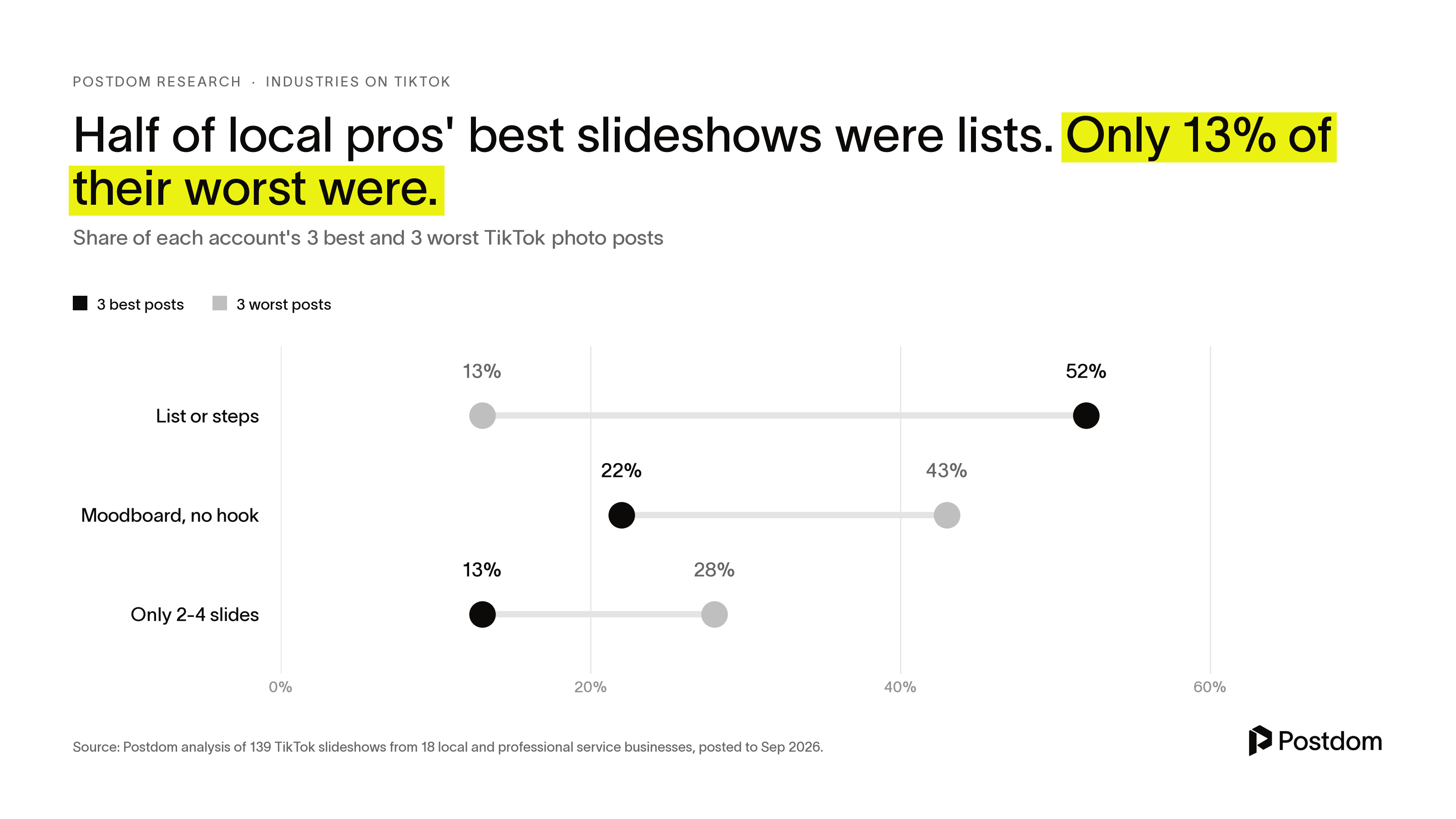
Local service businesses showed the gap clearly. Among 18 dentists, trainers, lawyers and similar pros, lists or steps made up 52% of each account's three best photo posts and 13% of its three worst.
Make it worth saving
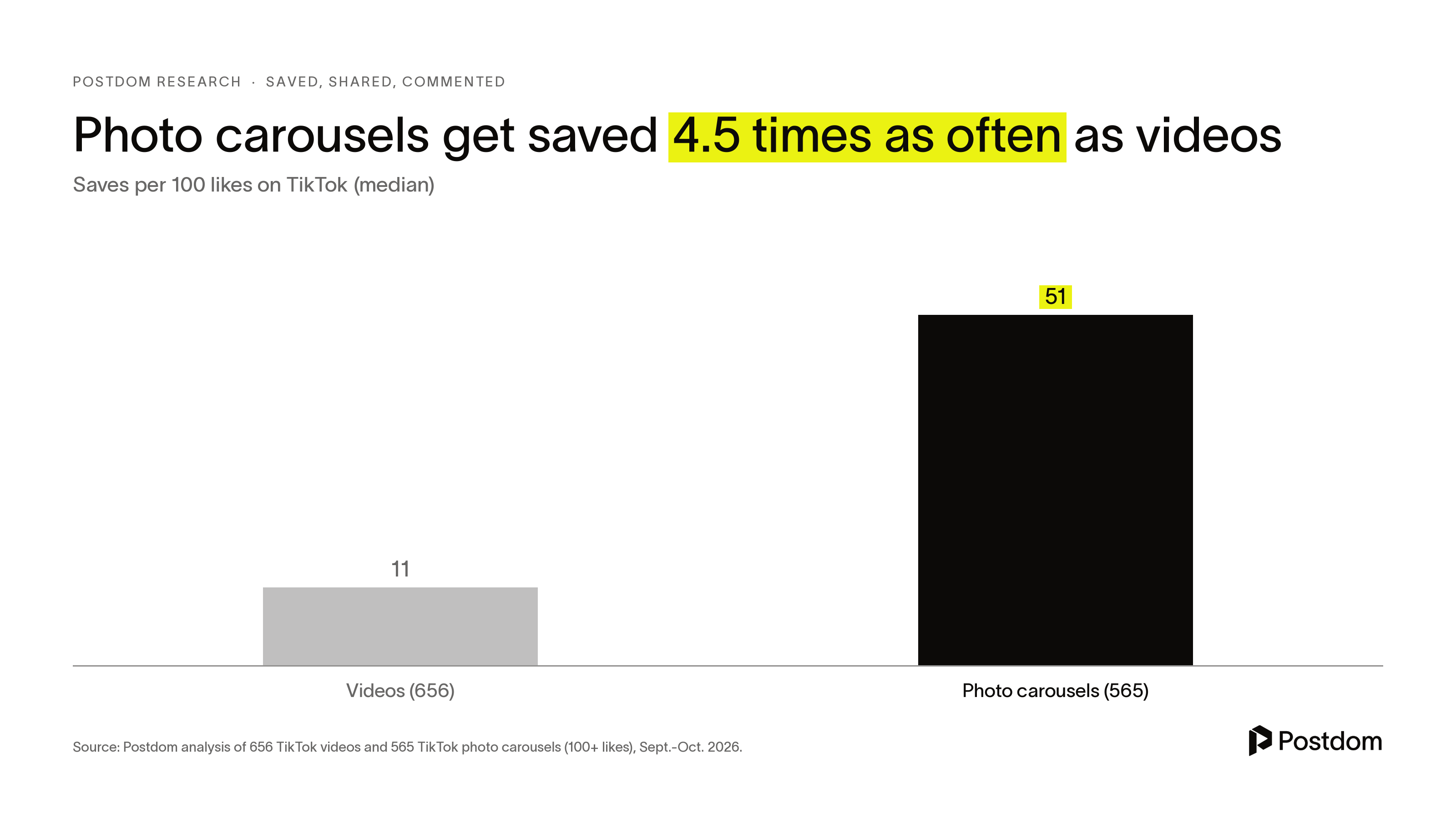
People treat photo slideshows like a reference shelf. In our study of what people save on TikTok, photo carousels drew a median 51 saves per 100 likes, against 11 for videos. One in eight carousels had more saves than likes. Step-by-step slideshows reached 68 saves per 100 likes. Relatable ones managed 10.
Slideshows built to be kept, with steps, prices or a checklist, drew 3.13 times the views of the same account's other slideshows.
End on the last point, not a sales pitch
Slideshows that ended with a hard ask, such as "book now" or "link in bio", drew 0.52 times the views of the same account's other slideshows. End on your last list item or a one-line recap instead, and put the offer in the description.
Asking for the save in the description is a different story. The 53 carousels that asked viewers to save or share drew 79 saves per 100 likes, against 46 for carousels with no ask. That is a link, not proof: people tend to add "save this" to lists that get saved anyway.
Expect fewer comments
Slideshows are quiet. They drew 0.65 comments per 100 likes, less than a third of the video rate. If comments are your goal, a video with a warning hook, such as "What NOT to do", did far better in the same study.
A note on the numbers: each account's three best, three worst and two middle posts were sampled, which inflates the size of each effect. Treat the direction as firmer than the exact multiple. These are correlations, not proof of cause.
FAQ
How many photos can you put in a TikTok slideshow?
Up to 35, according to TikTok's help center as of October 2026. In our data, the best results came from 5 to 7 slides, so you rarely need anywhere near the limit.
Can you add music to a TikTok slideshow?
Yes. After you tap Next, you can add a sound, as well as text, stickers and filters. If you use an effect template from a Business Account, TikTok limits you to templates with music licensed for commercial use.
Is it free to make a slideshow on TikTok?
Yes. The photo post and its editing tools are part of the TikTok app, and posting costs nothing. Postdom's Free plan also makes 5 posts a month, slideshows included, with no card.
Why does my TikTok slideshow get no views?
In our study of 1,018 slideshows, the weakest ones gave the answer on slide 1, used only 2 to 4 slides, were moodboards with no hook, or ended on a hard sell. Fix the first slide first. Slideshows that opened a question there drew 2.84 times the views of the same account's other posts.
Can I schedule a TikTok slideshow?
TikTok's help center describes scheduling from TikTok on a computer: upload, switch on the schedule toggle, and pick a time from 15 minutes to 10 days ahead. It says only Business Accounts or accounts with 10,000 or more followers can schedule this way, and it describes videos, not photo posts. Postdom also schedules slideshows to TikTok, Instagram, Facebook and LinkedIn, and by default you approve each one first.
Should I post a slideshow or a video on TikTok?
It depends on what you want. In our data, photo slideshows were saved 4.5 times as often as videos per 100 likes but drew far fewer comments. Use slideshows for lists and steps people will come back to, and videos when you want comments.
Related
All posts