Research
How to make a carousel on Instagram (2026 steps, sizes and examples)

The exact taps to post an Instagram carousel of up to 20 photos and videos, checked against Instagram's help center, with sizes, real examples and what gets saved.

On this page
Here is how to make a carousel on Instagram: tap Create, tap POST, then tap SELECT MULTIPLE and pick up to 20 photos and videos. Adjust the crop, tap Next, add filters and drag the slides into order. Tap Next again, write one caption or one per slide, add tags or a location, and tap Share.
People see the first slide in their feed with a row of dots below it, and swipe to see the rest. We checked these steps against Instagram's help center (iPhone and Android apps) on 5 October 2026.
How to make a carousel on Instagram, step by step
- Tap Create at the top, or swipe right anywhere in your Feed.
- Tap POST, then tap SELECT MULTIPLE.
- Select up to 20 photos and videos from your phone's library. Tap each one, then touch the screen to adjust how it sits in the frame. Tap Next.
- Tap a filter at the bottom to apply it to every slide, or tap a single photo or video to edit it on its own.
- To change the order, tap and hold a slide and drag it to a new spot. To remove one, tap and hold it, then drag it to the remove icon. Tap Next.
- Choose Single caption for one caption on the whole post, or Multiple captions to write one for each slide. Our character and hashtag limits list shows how much room you have.
- Add a location if you want one. To tag someone, tap Tag People, then swipe to the photo you want to tag them in.
- Tap Share.
To add a song, Instagram's music steps for carousels put Add music on the screen after filters: tap Add music, pick a song from For you, Browse or search, choose the part that plays and tap Done. Instagram says music can't be added to carousels that include videos.
Instagram carousel size
Instagram's image resolution page gives the numbers. Photos are shared up to 1,080 pixels wide. If a photo's width is between 320 and 1,080 pixels and its shape is between 1.91:1 (wide) and 3:4 (tall), Instagram keeps it as it is. That means 1,080 pixels wide and 566 to 1,440 pixels tall.
- Wider or taller than that, and Instagram crops it to a supported shape.
- Narrower than 320 pixels, and it's enlarged to 320. Wider than 1,080, and it's sized down to 1,080.
- To post at full quality, upload photos at least 1,080 pixels wide, in a shape between 1.91:1 and 3:4.
For a carousel, one more rule matters most. The orientation you pick, square, portrait or landscape, applies to every slide. You can't mix them in one post, so make every slide the same shape before you start.
What is a carousel on Instagram
A carousel is a single Instagram post that holds up to 20 photos and videos. In the feed, people see the first slide with a row of dots under it and swipe for the rest. On your profile it shows as one tile, the first slide, with a small icon in the top right.
Likes and comments land on the whole post, not on single slides. And Instagram treats videos inside a carousel differently from reels: they don't appear in the Reels tab or get reels features. If a video should be found as a reel, post it as one. Our guide on how to make a reel on Instagram covers that.
How to post a carousel on Instagram
In the app, tap Create, tap POST, tap SELECT MULTIPLE, pick your photos and videos, then tap Share. On a computer, the steps are close to the app. Click Create on the left, click Post, then click Select from computer. Choose the option to select multiple files and pick up to 20 photos and videos. Click and hold a slide to adjust its crop, click Next, then drag slides to reorder them and click Next again. Add filters, write your caption, tag people and click Share.
You can fix a carousel after it goes live. Tap the three-dot menu on the post, tap Edit, then long-press to reorder slides. You can also remove slides, change the caption and edit tags and location. Tap Done to save. What you can't do is add new slides once it's shared.
To post later instead of now, Instagram lets public accounts schedule carousels: before sharing, tap More options, turn on Schedule this post, pick a date and time, tap Done, tap Back, then tap Schedule. You can schedule up to 25 posts a day, up to 30 days ahead.
Carousels with several videos take longer to upload, so post them on a steady connection.
How many slides can you have on Instagram
Up to 20 photos and videos in one carousel, according to Instagram's help center as of October 2026.
That doesn't mean you should use 20. Instagram hides save counts from the public, so we can't measure Instagram carousels directly. The closest data we have is TikTok's swipeable photo posts, the same format. Across 1,018 TikTok slideshows from 129 accounts, posts with 5 to 7 slides drew 1.71 times the views of the same account's other slideshows. Posts with 2 to 4 slides drew 0.40 times. The median best post ran 7 slides. Read our TikTok by industry study for the method.
Instagram carousel examples
Here are two carousels Postdom made, slide by slide. Both are for fictional sample brands Postdom invented for its gallery, not real businesses, and neither has been posted, so there are no view counts to report. They are here to show the pattern our data favours.
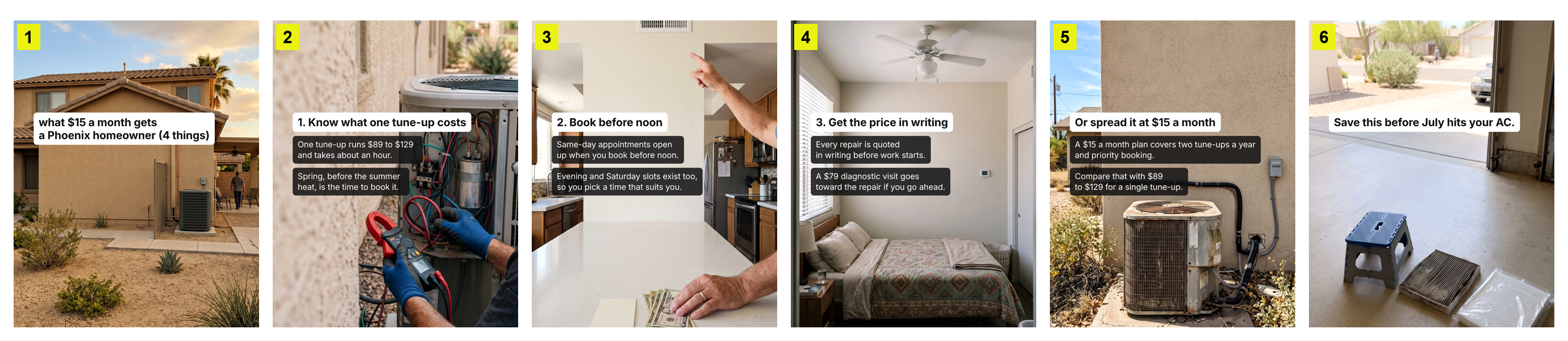
Example 1 follows the three biggest signals in our slideshow data. The first slide opens a question (2.84 times the views of the same account's other slideshows, against 0.46 times for giving the answer away). It is a numbered list (3.29 times). And it ends by asking for the save, not a booking (hard sells at the end drew 0.52 times).

Example 2 is a checklist people come back to before they buy, the kind of post that gets saved. Numbered lists and step-by-steps drew about 70 saves per 100 likes in our data, against 10 for relatable posts.
Make Instagram carousels faster with Postdom
Postdom reads your website and makes carousels, short-form videos and single images in your brand, with your colours, fonts and logo, like the two examples above. You approve, edit or reject each one, and Postdom learns from what you choose. Approved carousels are published to Instagram, TikTok, Facebook and LinkedIn on the schedule you set.
By default nothing goes out until you approve it. Once 9 of your last 10 carousels go through without edits, Postdom offers to publish that kind for you.
Free Instagram carousel maker
Instagram's own post tools are free, and for most carousels they are enough: crop, filters, order, captions, tags and music. If you'd rather not design every slide yourself, Postdom's Free plan makes 5 posts a month from your website, carousels included, on 1 connected account with no card. Free posts carry a Postdom watermark, which you can turn off on paid plans.
What makes an Instagram carousel worth saving
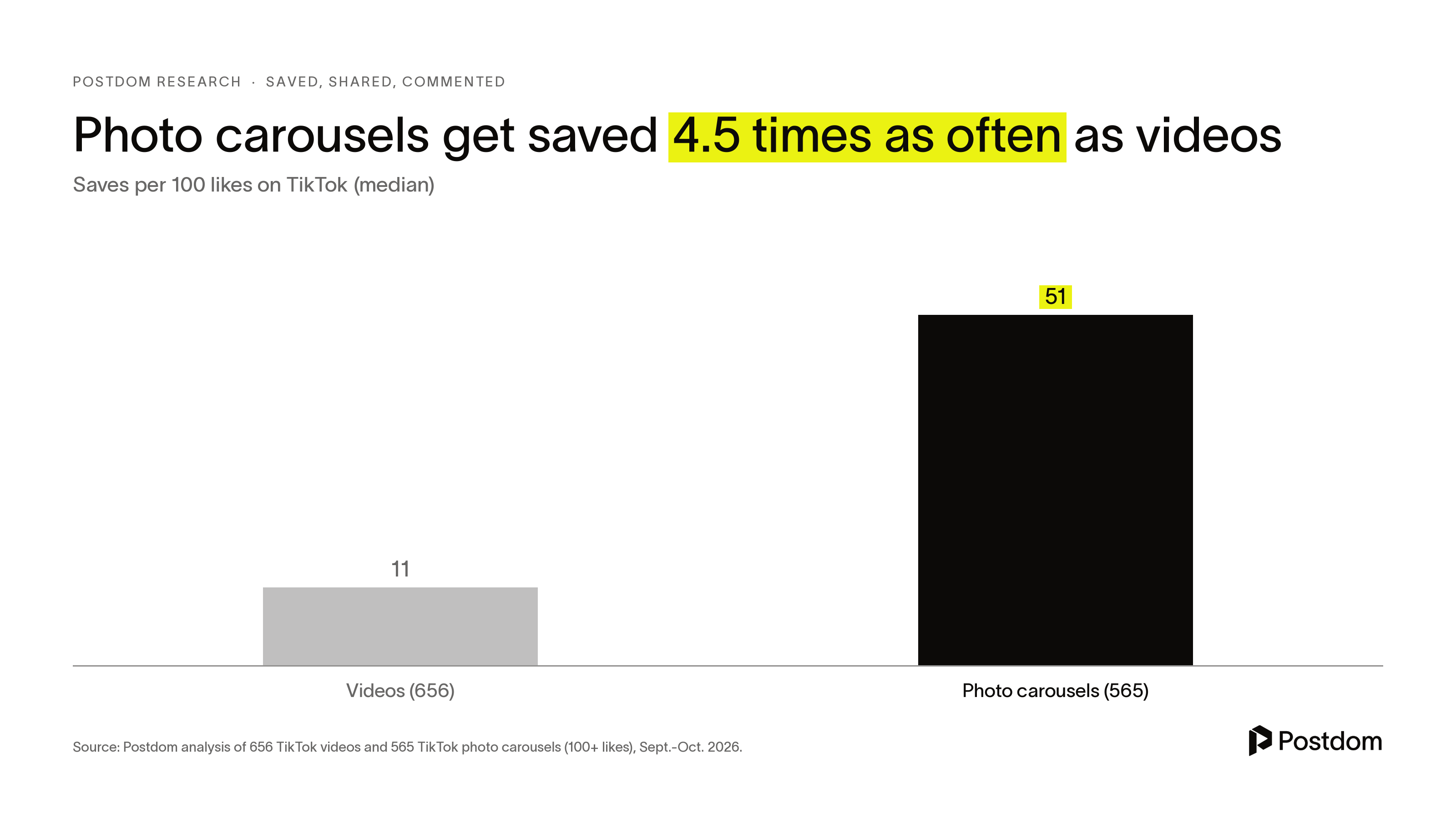
Because Instagram hides save counts, this data comes from TikTok photo carousels, which work the same way: one post, several slides, a swipe between each. In our study of what people save, 565 photo carousels drew a median 51 saves per 100 likes, against 11 for videos.
Carousel ideas that get saved
- Step-by-step guides: 68 saves per 100 likes.
- Numbered lists, such as "5 things to check": 71.
- Recipes and tutorials: 75.
- Relatable posts drew 10, and personal stories 11. People save what they plan to use again.
Hold the answer back on slide 1
Slideshows whose first slide opened a question or promise drew 2.84 times the views of the same account's other slideshows. Slideshows that gave the answer on slide 1 drew 0.46 times. Lists and steps drew 3.29 times, and moodboards with no hook drew 0.34 times.
Ask for the save in the caption
The 53 carousels whose caption asked viewers to save or share drew 79 saves per 100 likes, against 46 for carousels with no ask. They drew nearly twice the shares, too. That is a link rather than proof, since people add "save this" to posts that get saved anyway.
Leave the sales pitch off the last slide
Slideshows that ended on a hard ask such as "book now" drew 0.52 times the views of the same account's other slideshows. Finish on your last point or a short recap, and put the offer in the caption.
Carousels are quiet, though. They drew 0.65 comments per 100 likes, under a third of the video rate. If you want a conversation, use a reel.
Seamless carousels
A seamless carousel is a design trick, not an Instagram setting. Design one wide image, cut it into equal slides of the same shape, and upload them in order, so the picture flows across the swipe.
A note on the numbers: they compare posts within the same account, from a sample that included each account's best and worst posts. That inflates the size of each effect, so trust the direction more than the exact multiple.
FAQ
How many photos can you post in an Instagram carousel?
Up to 20 photos and videos in one post, as of October 2026.
What size should Instagram carousel slides be?
At least 1,080 pixels wide, in a shape between 1.91:1 and 3:4. Instagram keeps photos in that range at up to 1,080 by 1,440 pixels and crops anything outside it. Every slide uses the same orientation.
Is a carousel on Instagram a post or a reel?
A post. Instagram says videos inside a carousel are not reels and won't show in the Reels tab.
Can you turn a post into a carousel?
Not by adding slides. Instagram doesn't let you add photos or videos after sharing, so delete the post and share it again as a carousel.
Can you edit an Instagram carousel after posting?
Yes. Tap the three-dot menu, tap Edit, and you can reorder or remove slides and change the caption, tags and location. You can't add new slides after sharing.
Can you add music to an Instagram carousel?
Yes, to photo carousels. After filters, tap Next, then Add music. Instagram says music can't be added to carousels that include videos.
Can each slide in a carousel have its own caption?
Yes. When you reach the caption step, choose Multiple captions instead of Single caption.
Can I schedule an Instagram carousel?
Yes, from a public account. Before you share, tap More options and turn on Schedule this post. Instagram allows up to 25 scheduled posts a day, up to 30 days ahead. Postdom schedules carousels to Instagram, TikTok, Facebook and LinkedIn, and by default each one waits for your approval.
Related
All posts