Research
How to make money on Instagram in 2026: 6 ways, with real numbers
How to make money on Instagram, checked against its own help pages on 5 October 2026: who qualifies, the exact steps, what each way pays, and the catch.

On this page
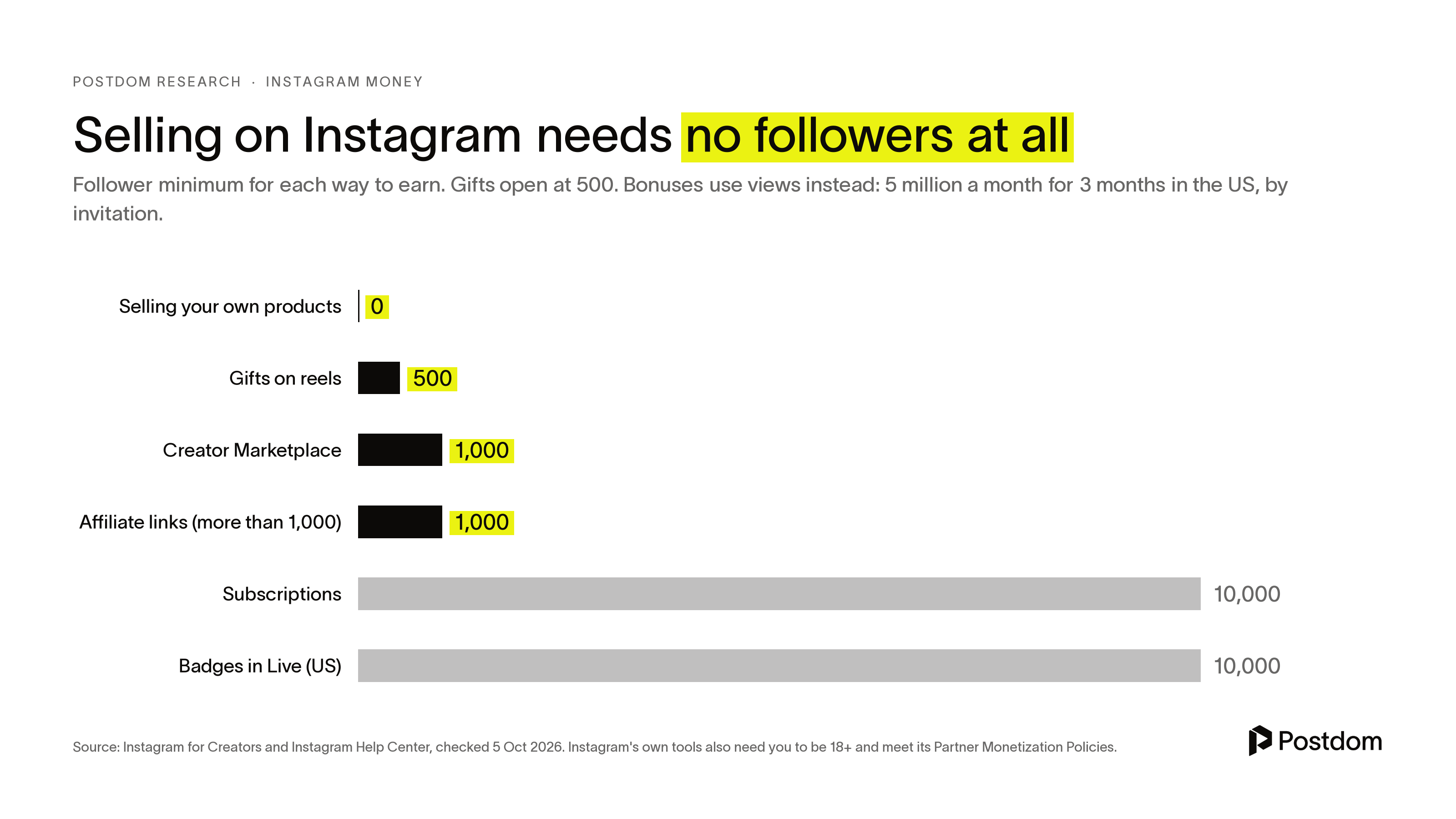
Here is how to make money on Instagram in 2026: switch to a professional account, then use the tools you qualify for. Selling your own products or services needs no follower minimum. Gifts on reels open at 500 followers. Brand deals through Instagram's Creator Marketplace and affiliate links open at about 1,000. Subscriptions and Live badges need 10,000. Bonuses, the only way Instagram pays you for views, are invitation-only. Instagram's own money tools need you to be 18 or older and to follow its Partner Monetization Policies.
We read every Instagram for Creators page and Help Center article on these tools on 5 October 2026, and the eligibility rules, steps and payout terms below come from them. Earnings figures come from Instagram where it publishes them, and from dated outside sources where it doesn't. Where nobody publishes a number, we say so.
| Way | Who qualifies | What it pays | The catch |
|---|---|---|---|
| Brand deals | 1,000+ followers for Creator Marketplace, any size for direct deals | $10 to $100 a post under 10K followers, $100 to $500 at 10K to 100K (IMH, Aug 2026) | You negotiate every deal and must label it |
| Selling your own products | Business account, no follower minimum | Your margin | Shops need commerce approval and a domain you own |
| Affiliate links | 18+, public professional account, more than 1,000 followers | The partner's commission, often 1% to 10% (Amazon's rates) | Still rolling out, and the partner pays, not Meta |
| Subscriptions | 18+, 10,000 followers, eligible country, may need an invite | Your monthly price, minus 30% on in-app purchases | You owe subscribers new content every month |
| Gifts (and Live badges) | Gifts: 500 followers. Badges: 10,000 in the US | $0.01 a star. Badges sell at $0.99, $1.99 and $4.99 | Small sums unless your audience is large and loyal |
| Bonuses | Invitation only. 5M views a month for 3 months in the US | Not published | You can't apply, and the view bar is high |
How to make money on Instagram: the 6 ways
The order below runs from the way most accounts can start this week to the one most will never see. Each has the same four parts: who qualifies, the steps, what it pays and the catch.
1. Brand deals and Creator Marketplace
Who qualifies. Anyone can take a brand deal. To be found through Instagram's own Creator Marketplace, you need to be 18 or older, have a public professional account with at least 1,000 followers, and agree to the Partner Monetization Policies. It is open in every country where Meta advertising runs, except Crimea, Cuba, Iran, North Korea, Syria and Russia.
The steps.
- Switch to a professional account (creator or business) if you haven't.
- If you meet the requirements, Instagram invites you to onboard to Creator Marketplace. Add the brands and interests you'd like to work with so the projects you get fit.
- Brands send projects with the details and the rate to a Partnership messages folder at the top of your Primary inbox. Review them there.
- Check that you can tag partners under Professional dashboard, Branded content tools. When you post, turn on the "Add paid partnership label" toggle and tap "Add brand partners" to tag the business.
- Ask the brand to run your post as a partnership ad, and charge for it.
How to find brands. Tag brands you already use and buy, answer the projects that arrive through Creator Marketplace, and email a brand's marketing contact with your follower count and your average likes, views, comments and shares. Instagram's Creator Marketplace page suggests bringing exactly that data to back up your rate.
What it pays. Instagram doesn't set rates. You negotiate each deal. Influencer Marketing Hub's Instagram rate guide, updated 31 August 2026, puts a sponsored feed post at about $10 to $100 for accounts under 10,000 followers, $100 to $500 at 10,000 to 100,000, $500 to $5,000 at 100,000 to 500,000, $5,000 to $10,000 at 500,000 to 1 million, and $10,000 or more above that. It adds that Stories often sell in sets at 30% to 50% of the feed post rate.
Instagram's own partnership ads page tells creators to ask for more when a brand wants to boost the post as an ad, because the brand is buying wider use of your content.
The catch. You need the label on anything you were paid for in any form. Instagram's Creator Marketplace page says that includes free trips and gifted products. Some products, such as drugs and weapons, can't be promoted at all, and others, such as alcohol, only with restrictions. And content with licensed music can't run as a partnership ad, so use royalty-free music from Meta's library on posts a brand may boost.
2. Selling your own products or services
Who qualifies. Any business account. There is no follower minimum. This is the one way to make money on Instagram that's open from your first post.
The steps. The simplest route needs no catalog or shop. Instagram's help page lays it out:
- Tap Create and select Post, then pick a photo or video and tap Next.
- Tap More options, then Add product details.
- Add the product's name and price, tap Done, then Share.
- When someone requests an order, it arrives in your Instagram chat, where you accept or decline it and track its status.
For stories, add the Get orders sticker and fill in the product. If you sell enough to want a storefront, Shops on Instagram add product tags, collections and product pages, but they are only available in markets with checkout on Instagram. Creators with merch on Spring, Represent or Fanjoy can run a merch launch.
What it pays. Whatever your margin is. Instagram's help page on order requests doesn't list a fee for sales agreed in chat.
The catch. To sell through a shop, you must meet Meta's commerce eligibility requirements: follow its policies, represent a real business and a domain you own, be in a supported country and show you are trustworthy. Fail any of them and you can lose access to shops on Instagram and Facebook. And posts that sell hard got far fewer likes in our data, as shown further down.
3. Affiliate links
Who qualifies. Instagram's affiliate page asks for an age of 18 or older, a public professional account, more than 1,000 followers and a supported market, plus the Partner Monetization Policies. It says the feature is rolling out gradually, so some eligible creators won't see it yet.
The steps. From Instagram's help page:
- Go to your Professional dashboard, tap Monetization, then Affiliate programs, and connect to a partner's program. If you don't have an account with that partner, you sign up during this step.
- Create a reel as usual.
- Before sharing, tap Add products, then pick the affiliate program.
- Paste the product's link or search for it by name, select it and tap Share.
Separately, the Add products tool lets eligible creators paste an affiliate link to a single product from a brand's catalog on Meta, up to 30 products on a reel or 20 on a feed post.
What it pays. The partner's commission, not Instagram's. Meta says commissions are paid by the affiliate partner and that it doesn't process them. For scale, Amazon Associates' standard rates, checked 5 October 2026, run from 0% on gift cards to 10% on luxury beauty, with 4.5% on kitchen and books, 3% on home and toys, and 4% for anything not listed. A $40 kitchen product at 4.5% earns you $1.80 a sale.
The catch. Meta hides the product tag if the product isn't actually in your reel or post, is out of stock, or fails its commerce checks. Small commissions mean you need a lot of buyers.
4. Subscriptions
Who qualifies. In the US, Instagram's Subscriptions page lists an age of 18 or older, 10,000 followers, an eligible country and both monetization policies. Eligible countries include the US, UK, Canada, Australia, India, Brazil, Mexico, Japan, Korea and most of the EU, 46 in all. Instagram's page also says you set it up once you've been invited, so it may not appear for every eligible account.
The steps. From Instagram's setup page:
- Go to your profile and tap Professional dashboard, then scroll down and tap Monetization.
- Select your monthly price, then tap Publish, then Done.
- Your followers are notified in their activity feed after 3 days and see a Subscribe button on your profile. Tap Notify now to tell them straight away.
- Post subscriber-only stories, lives, posts and reels, and start group chats of up to 30 subscribers. Subscriber posts and reels sit under the crown tab on your profile.
What it pays. You set the price. Instagram's pricing page says Google and Apple deduct 30% of all in-app purchases in fees, and that Instagram currently receives no portion of those fees. It also says subscriptions bought during an Instagram Live pay you 100% of the revenue, minus applicable taxes and fees. As our own arithmetic, 50 subscribers at $4.99 a month bought in the app comes to about $175 a month before tax.
The catch. A subscription is a promise to post something new every month. If you change the price, it only applies to new subscribers.
5. Gifts on reels and badges in Live
Who qualifies. Gifts need a professional account, an age of 18 or older, 500 or more followers, an eligible country and the Partner Monetization Policies. Badges in Live need 10,000 followers in the US. In the UK, France, Spain, Italy, Germany, Japan, Australia, Turkey, Brazil and Mexico, badges are invitation-only.
The steps. For gifts, set up a payout account, then keep posting reels. Fans buy Stars and send them as gifts on reels they like. For badges, go to your Professional dashboard and tap Set up badges. Once you have access, badges switch on for every live.
What it pays. Instagram pays $0.01 for every Star you receive, so 100 Stars is $1. Viewers buy badges in Live at $0.99, $1.99 and $4.99. If a fan sends a gift before you've set up a payout account, you can see who sent it but you can't receive the earnings.
The catch. These are tips, and tips are small. A reel that collects 2,000 Stars earns you $20.
6. Bonuses
Who qualifies. Instagram's bonus page says bonuses are limited-time and invitation-only. The bonus for reels needs at least 5 million views in each of the previous three calendar months and is only in the US and South Korea. The bonus for photo and carousel posts needs a monthly view minimum for three months in a row: 5 million in the US, 1 million in South Korea and Ireland, 2 million in South Africa, and 500,000 in Japan, the UK, Australia, Canada, New Zealand, Sweden, Denmark, Finland and Norway. You must be 18 or older, have a professional account and be located with tax status in Japan, South Korea or the US. Instagram's page lists view thresholds for other countries but says invitations need tax status in one of those three, so the two don't fully match. Even then, Instagram says not every eligible creator is picked.
The steps. If you're invited, the invitation appears on your Professional dashboard. Tap it, follow the prompts and tap Activate bonus. Instagram counts up to 150 pieces of content from the week you activate until the bonus ends.
What it pays. Instagram doesn't publish a rate. It says only that the more bonus plays or views your content receives, the more you earn, and replays don't count.
The catch. You can't apply. And the view minimum alone rules out almost every small account.
How to monetize Instagram
Whichever way you pick, the setup is the same.
- Switch to a professional account. All of Instagram's own money tools need a creator or business account.
- Open your Professional dashboard and tap Monetization to see which tools you're eligible for today.
- Check your Account Status. Instagram's monetization page says it shows whether your content can be recommended to people who don't follow you, and lists anything that goes against its guidelines.
- Set up a payout account before you earn anything (see the next section).
- Turn on the tools you qualify for. Start with selling, which has no follower bar, and brand deals, which pay the most per post.
How to get paid on Instagram
Gifts, badges, subscriptions and bonuses all pay out through one payout account. Instagram's payouts page sets the rules:
- In the US, you're paid once a month after your balance reaches $5. Elsewhere it's $25, or $100 by wire transfer. Below that, the balance rolls over. Instagram's Gifts page says $25, so its pages disagree. Check Professional dashboard, Tools, Payouts for the threshold on your account.
- Most tools pay around the 21st of each month for the previous month's earnings. Bonuses pay around the 7th and 21st.
- Without a payout account, you can earn up to $500 per tool and $1,500 across 3 tools. If you don't add one within 6 months, you forfeit those earnings.
- Changing your payout details puts the account on a 5-day hold, so make changes at least 10 days before a payment date.
- Bank transfers take 1 to 7 business days, and international payouts up to 10 days.
Brand deals and affiliate commissions don't go through Instagram at all. The brand or the affiliate partner pays you directly, on their own terms.
How many followers on Instagram to get paid
It depends on the tool. You can sell from your first follower. Gifts start at 500 followers, Creator Marketplace at 1,000, and affiliate links at more than 1,000. Subscriptions and US Live badges need 10,000. Bonuses ignore followers and count views instead.
Does Instagram pay you for views
Only through bonuses. Gifts, badges and subscriptions are paid by your fans, brand deals by brands, and affiliate commissions by partners. Views themselves earn nothing unless Instagram has invited you to a bonus, and the US bar for that is 5 million views a month for three months in a row.
Views still matter, because they bring the followers and the reach that brands pay for. Our guides on how to make a reel on Instagram and how to make a carousel on Instagram cover what got views in our data.
How much does Instagram pay for 1,000 views
Instagram doesn't publish a rate. Its bonus page says only that more bonus plays or views mean more earnings. Any figure you see per 1,000 views is a creator's own report from one bonus at one time, not a rate you can plan around. Most accounts never get a bonus, so for them the honest answer is $0.
If you want to compare, TikTok works differently. See how to make money on TikTok.
How to make money on Instagram without followers
Two of the six ways work for a brand-new account, and a third route uses Instagram without any of its money tools:
- Sell something. Order requests through Add product details need a business account and nothing else.
- Pitch brands directly. Creator Marketplace needs 1,000 followers, but a brand can pay any account it likes.
- Make UGC for brands. Brands pay creators for videos they post on their own accounts, so your follower count matters less. You pitch and invoice them directly, outside Instagram. We haven't found a dated, sourced rate for this, so we won't quote one.
- Use your account to sell a skill. Your posts can bring clients for a service you already offer, or sell a digital product: a template, a course, or calls booked from your bio link. Our guide on how to make money with AI covers services you can run with AI tools.
What our data says about selling on Instagram
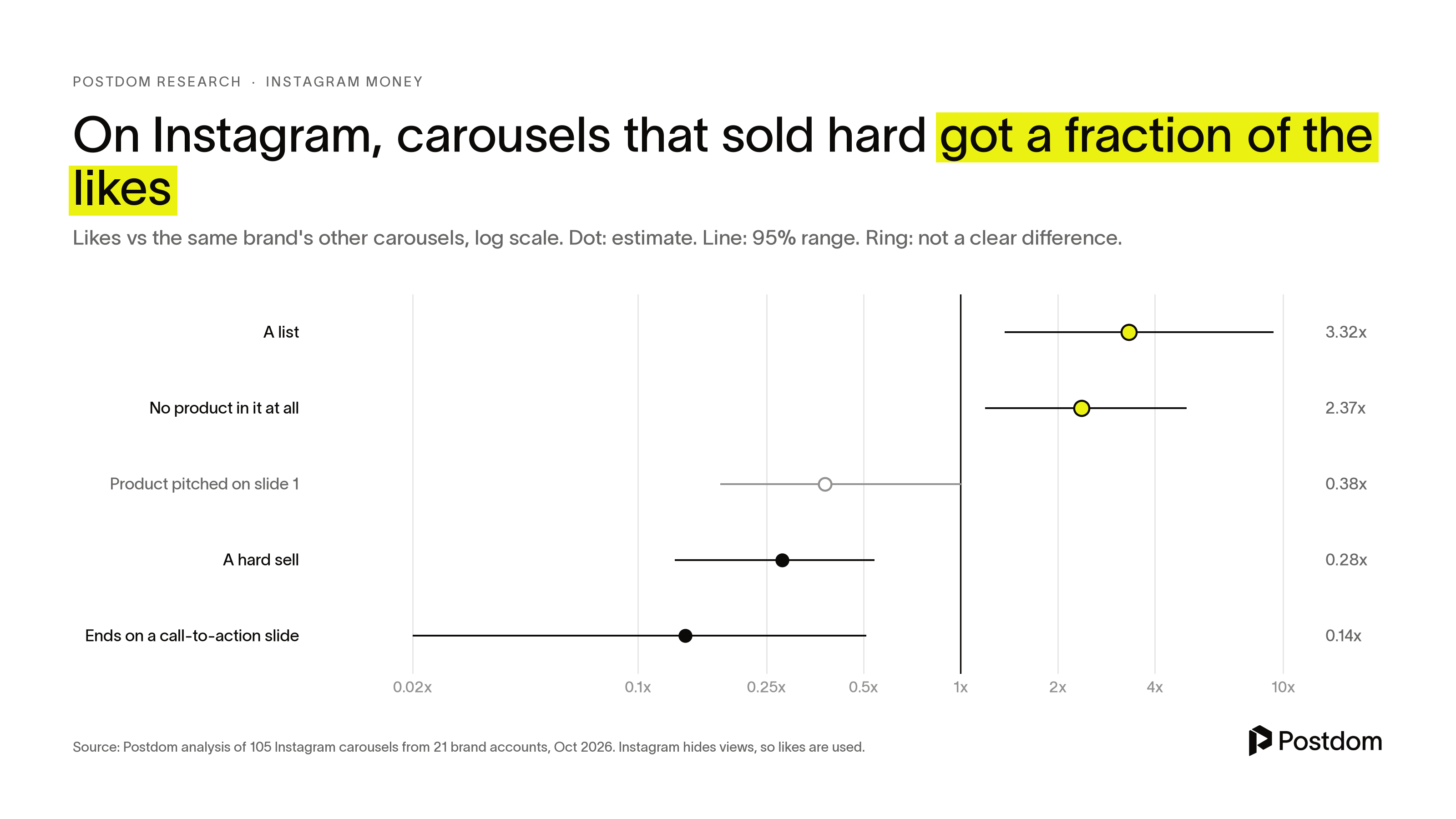
Posts that sell tend to get fewer likes. In Postdom's study of 105 Instagram carousels from 21 brand accounts, each compared with the same brand's other carousels, a hard sell drew 0.28 times the likes, and ending on a call-to-action slide 0.14 times. Carousels with no product in them at all drew 2.37 times, and lists 3.32 times. Instagram hides views, so we used likes.
So mix it up. Teach in most posts and sell in a few. When a post does sell, make the product one item in a useful list rather than the hook. If your goal is leads, a caption asking people to comment a keyword drew 5.09 comments per 100 likes on Instagram Reels in our data, against 2.23 with no ask (from 17 and 46 Reels). It has a cost: on TikTok slideshows the same ask went with about half the usual views, so save it for posts whose job is leads.
The same held on TikTok. In our study of 2,138 TikTok posts, slideshows that ended on a hard ask such as "link in bio" drew 0.52 times the views of the same account's other slideshows, and in our study of what people save on TikTok, tutorials were saved about 10 times as often as jokes. For reach first, see how to get more views on TikTok and how to go viral on TikTok.
If keeping up the posting is the hard part, Postdom reads your website and makes carousels and short-form videos in your brand. By default, each post waits for your approval before anything is published. Videos it makes go to Instagram, TikTok, YouTube, Facebook and LinkedIn, and your own uploads to all 9 platforms it supports. The Free plan is $0 for 5 posts a month on 1 account, with a Postdom watermark.
What to avoid
Instagram's monetization guidance names the content that gets accounts demonetized. Avoid:
- Videos visibly recycled from other apps, especially with their fonts or watermarks still on.
- Video or pictures you don't own the rights to.
- Music that isn't from Facebook's or Instagram's music libraries.
- Anything interruptive, exaggerated, misleading or baiting.
- Paid posts without the paid partnership label, including gifted products and free trips.
- Earning for months without a payout account. After 6 months, Instagram keeps the money.
- Licensed music in content a brand may run as a partnership ad.
- Hard sells in every post. In our data, they cost most of the likes.
- Anyone selling followers, likes or a faster route into a bonus. Bonuses are invitation-only, and there is no form to apply.
FAQ
Do Instagram users get paid?
Not for posting, unless they use a monetization tool. Instagram itself only pays through invitation-only bonuses. Everything else comes from fans (gifts, badges, subscriptions), brands (brand deals) or partners (affiliate commissions).
How much does Instagram pay for 1,000 views?
Instagram doesn't publish a rate, and it only pays for views through invitation-only bonuses. For most accounts the answer is nothing. Money on Instagram comes from brands, fans and your own sales.
How many followers do you need to get money on Instagram?
None to sell your own products. 500 for gifts, 1,000 for Creator Marketplace, more than 1,000 for affiliate links, and 10,000 for subscriptions and US Live badges, per Instagram's pages checked 5 October 2026.
Can you make money on Instagram with 1,000 followers?
It's possible, but rarely much. At 1,000 followers you qualify for more tools: you can join Creator Marketplace, and affiliate links open just above it. Whether you earn depends on brands booking you or people buying through your links, and many small accounts earn little or nothing. When a brand does book you, Influencer Marketing Hub (August 2026) puts sponsored posts at about $10 to $100 for accounts under 10,000 followers.
Does Instagram pay for reels?
Only through the invitation-only bonus for reels, available in the US and South Korea to creators with at least 5 million views in each of the last three months. Reels can also earn gifts from fans once you have 500 followers.
When does Instagram pay you?
Around the 21st of each month for the previous month's earnings, and around the 7th and 21st for bonuses. In the US, Instagram's payouts page says you need a balance of at least $5, though its Gifts page says $25. Check your Payouts screen. Brand deals and affiliate commissions are paid by the brand or partner on their own schedule.
Does Instagram take a cut of subscriptions?
Instagram says it currently receives no portion of in-app purchase fees, and that Google and Apple deduct 30% of all in-app purchases. Subscriptions bought during a Live pay you 100%, minus applicable taxes and fees.
How much money can you make on Instagram?
It ranges from cents to thousands a post. Gifts pay $0.01 a star. Influencer Marketing Hub (August 2026) puts brand deals at $100 to $500 a post for 10,000 to 100,000 followers and $5,000 to $10,000 at 500,000 to 1 million. Selling your own products earns whatever your margin is on each sale, and nothing if nobody buys.
Do I need a business account to make money on Instagram?
You need a professional account, either creator or business. Selling with order requests in chat needs a business account specifically.
Why isn't my Instagram payout coming through?
Instagram's payouts page lists the usual causes. Your balance may be below the minimum, which rolls over to the next month. Changing your payout details puts a 5-day hold on the account. The payout account may be incomplete or wrong. Or Instagram may have flagged suspicious activity. Bank transfers can also take 1 to 7 business days. If none of those fit, request support in the Instagram app.
How many followers on Instagram do you need to make $1,000 a month?
No follower count guarantees it. At Influencer Marketing Hub's August 2026 rates, $1,000 a month means about 10 to 100 sponsored posts under 10,000 followers, or 2 to 10 at 10,000 to 100,000. Selling your own product can get there with far fewer followers if your margin is good and people buy.
How can I increase my Instagram followers for free?
Post reels and carousels people want to keep or send on: in our data, carousels built as lists got about three times the likes of the same brand's other carousels. Our guides on how to make a reel on Instagram and how to make a carousel on Instagram cover the details.
Is it free to use Instagram's monetization tools?
Yes, turning them on costs nothing. Fees come out of what fans pay: Apple and Google take 30% of in-app subscription purchases, for example.
Related
All posts