Your workflow
The best social media management software in 2026, with real prices


On this page
Social media management software is a tool that helps you plan, make, publish and measure posts across your social accounts from one place. Most also add an inbox for replies, approvals for teams and reports. For a small business, the best pick is the one that does the hardest job for you, and for most owners that job is making the posts. That is why Postdom is our top pick here.
Postdom publishes this guide and sells one of the products in it. We say what each tool is good at and where Postdom falls short.
What social media management software does
The category is broad. Most tools cover some of these five jobs, and few cover all of them well.
- Making posts. Writing captions, making images, videos and slideshows. Many tools now add an AI writing helper. Few make finished videos for you.
- Publishing. A calendar or queue that posts to each account at a set time.
- Replying. A shared inbox for comments and messages, so nothing goes unanswered.
- Reading results. Reports on reach, views, clicks and growth, sometimes with competitor tracking.
- Getting sign-off. Approval steps so a manager or client checks posts before they go out.
If you only need the publishing part, our list of the best social media schedulers goes deeper on calendars and queues. This guide looks at the whole job.
Social media management platform
A social media management platform puts those jobs behind one login for every account. The alternative is each network's own app, plus Meta Business Suite for Facebook and Instagram. That costs nothing, but every platform is a separate place to post and check. A platform earns its price when you post to several networks or when more than one person touches the accounts.
How to choose social media management software
Start with the job that takes most of your week, then check the price for your real setup.
- Name your bottleneck. If you have plenty of posts but miss replies, you need an inbox. If you never have anything to post, you need a tool that makes posts.
- Count your accounts and people. Many tools charge per user, per channel or per brand. A $79 seat becomes $237 for a team of three.
- Check the entry plan, not the headline. Inboxes, approvals and listening often sit one or two plans up. We note where we saw this.
- Check the formats. TikTok, Instagram Reels and YouTube Shorts are built around short video. A tool that only schedules what you upload still leaves you to make the videos.
- Try it on your own accounts. Use a free plan or a free period before paying for a year.
Best social media management tools
The best social media management tools for most small businesses, in our order. Postdom is first because it makes the posts as well as scheduling them, which is the job that takes owners the most time. If your main job is answering messages, Agorapulse or Sprout Social will suit you better. Each card shows the entry price from the vendor's own page and the date we read it.
1. Postdom Our pick
Best for: Small businesses that need the posts made, not just scheduled
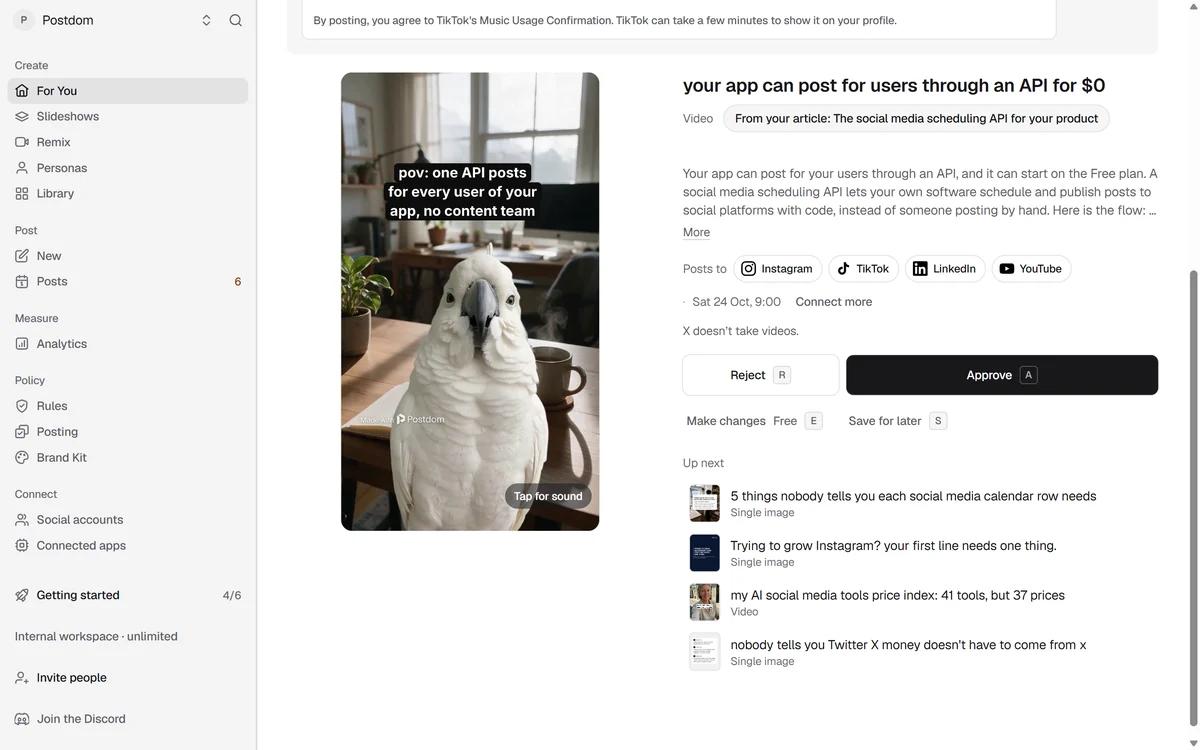
Postdom's For You feed: finished posts made from your website, ready to approve. Price: From $4.99 a month on Solo (videos, slideshows or single images). Starter is $39 a month for 40 posts on 3 accounts Source: postdom.com/pricing, checked 1 Nov 2026
Pros
- Makes short-form videos, slideshows and single images from your website, in your brand
- Schedules the posts you approve, by default at 9am and 7pm in your time zone
- Nothing posts until you approve it
- Members can approve and schedule like owners, except billing
Cons
- No social inbox, social listening or ads management
- No free plan
2. Hootsuite
Best for: Marketing teams that want publishing, inbox and listening in one place
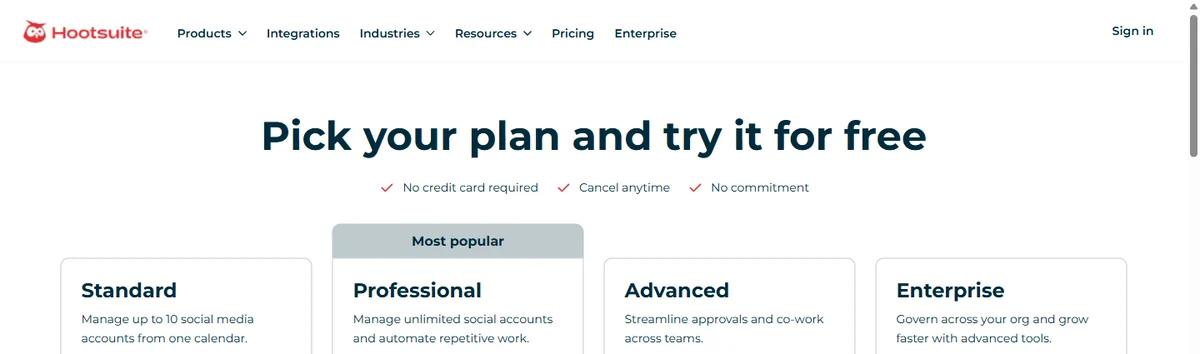
Hootsuite's plans page, 15 October 2026. Price: From $99 a user a month (Standard, billed annually) Source: hootsuite.com/plans, checked 14 Oct 2026
Pros
- One inbox for messages on the Standard plan
- Standard covers up to 10 social accounts
- AI post and image generation
Cons
- No free plan; can be tried free for 14 days
- Content approval starts on the Advanced plan ($399 a user a month, billed annually)
- You make the posts yourself
3. Sprout Social
Best for: Brands with a team that answers a lot of messages and reports to management
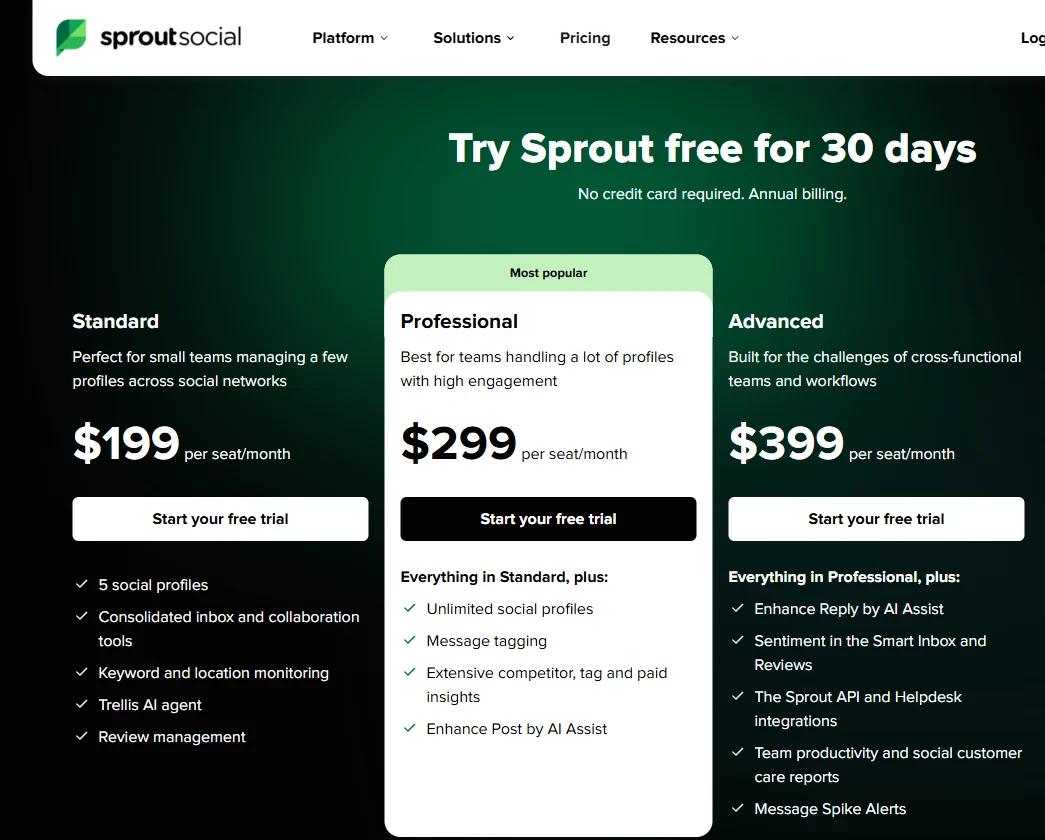
Sprout Social's pricing page, 15 October 2026. Price: From $79 a seat a month billed annually, or $99 billed monthly (Essentials) Source: sproutsocial.com/pricing, checked 14 Oct 2026
Pros
- Strong profile and post-level reporting
- AI assistant with monthly credits per seat
- Can be tried free for 30 days, no card
Cons
- No free plan
- Essentials covers 5 social profiles
- Per-seat pricing grows with every person you add
4. Buffer
Best for: Solo owners who make their own posts and want a cheap, simple queue
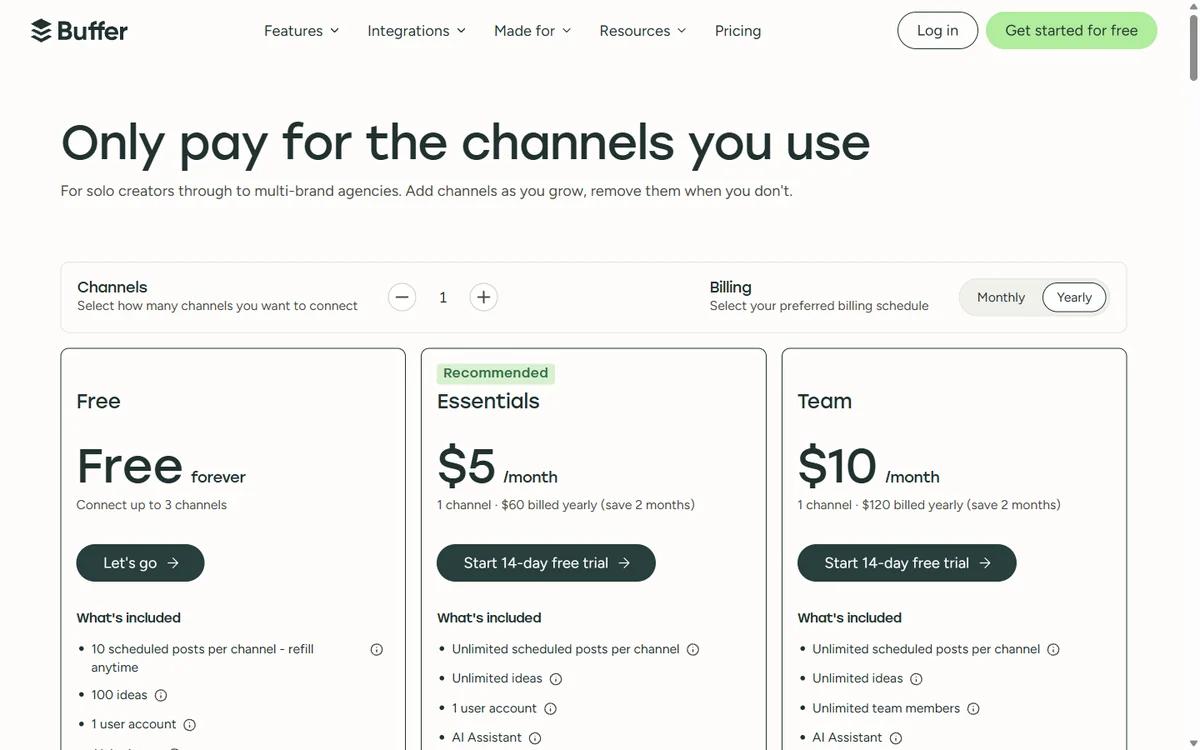
Buffer's pricing page, 15 October 2026. Price: Free for 3 channels; Essentials $5 a month per channel, billed yearly Source: buffer.com/pricing, checked 14 Oct 2026
Pros
- Free plan: 3 channels, 10 scheduled posts per channel
- Comment replies and an AI assistant even on Free
- Low per-channel price
Cons
- Approval workflows only on the Team plan ($10 a month per channel, billed yearly)
- You make the posts yourself
5. Later
Best for: Shops and creators who plan around how the Instagram grid looks
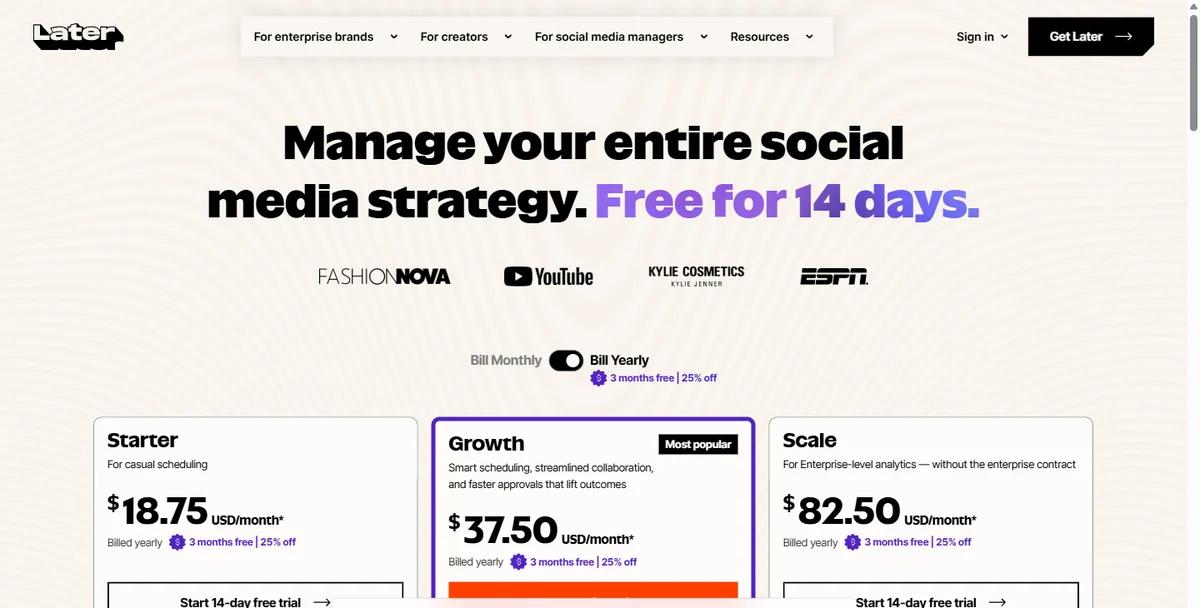
Later's pricing page, 15 October 2026. Price: From $18.75 a month (Starter, billed yearly) Source: later.com/pricing, checked 14 Oct 2026
Pros
- Starter covers 1 social set of up to 8 profiles
- Platform analytics with 3 months of history
- Can be tried free for 14 days
Cons
- No free plan
- No social inbox on Starter
- 5 AI credits a month on Starter
6. Metricool
Best for: Freelancers and small agencies that want reports for several brands
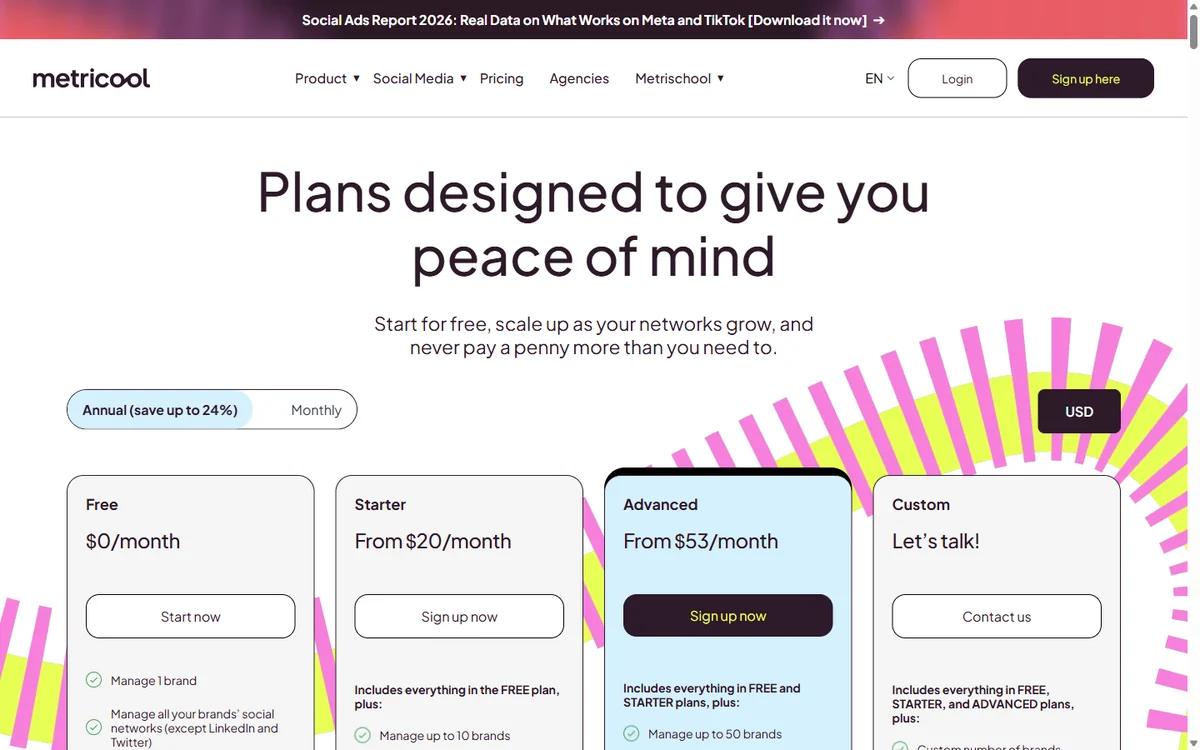
Metricool's pricing page, 15 October 2026. Price: Free for 1 brand; Starter from $20 a month billed annually, or $25 monthly Source: metricool.com/pricing, checked 14 Oct 2026
Pros
- Free plan: 1 brand, 20 posts a month, 30 days of analytics
- Tracks 5 competitor profiles even on Free
- Priced by brand, not by user
Cons
- Free plan excludes LinkedIn and X (Twitter)
- Approvals only on Advanced and Custom
- Prices exclude VAT
7. Agorapulse
Best for: Small teams that answer a lot of comments and want an inbox for less
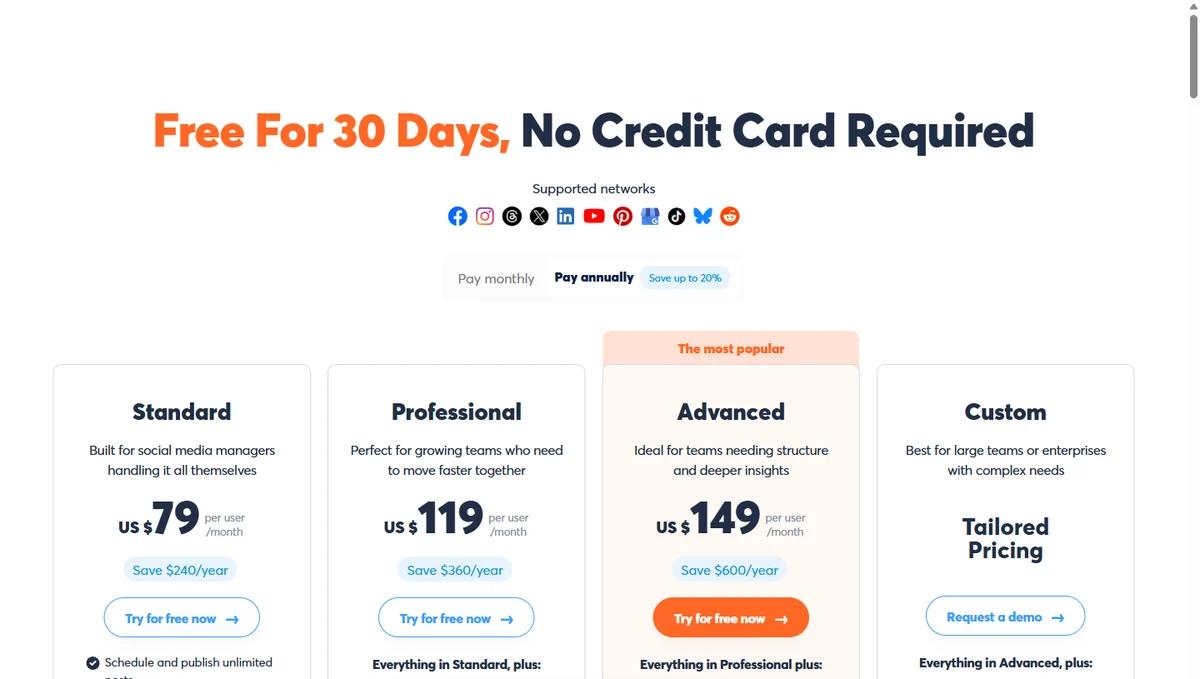
Agorapulse's pricing page, 15 October 2026. Price: From $79 a user a month billed annually, or $99 monthly (Standard) Source: agorapulse.com/pricing, checked 14 Oct 2026
Pros
- All-in-one social inbox on Standard
- 10 social profiles on Standard
- Can be tried free for 30 days, no card
Cons
- No approval workflow on Standard
- Per-user pricing
- Its free plan's limits aren't listed on the pricing page
Social media management software compared
| Tool | Best at | Entry paid price | Free plan | Source and date |
|---|---|---|---|---|
| Postdom | Making posts from your website and scheduling the ones you approve | $4.99 a month on Solo, 10 videos, slideshows or single images; $39 on Starter, 40 posts, 3 accounts | No. | Postdom pricing page, 1 Nov 2026 |
| Hootsuite | Inbox, listening and reporting for larger teams | $99 a user a month on Standard, billed annually | None listed | Hootsuite plans page, 14 Oct 2026 |
| Sprout Social | Reporting and customer care at scale | $79 a seat a month billed annually, or $99 billed monthly | None listed | Sprout Social pricing page, 14 Oct 2026 |
| Buffer | Simple publishing on a budget | $5 a month per channel on Essentials, billed yearly | Yes. Up to 3 channels, 10 scheduled posts per channel | Buffer pricing page, 14 Oct 2026 |
| Later | Visual planning and link in bio | $18.75 a month on Starter, billed yearly | None listed | Later pricing page, 14 Oct 2026 |
| Metricool | Analytics and competitor tracking for little money | From $20 a month billed annually, or $25 billed monthly | Yes. 1 brand, 20 posts a month | Metricool pricing page, 14 Oct 2026 |
| Agorapulse | Inbox and reporting for small teams | $79 a user a month billed annually, or $99 billed monthly | Mentioned, limits not listed | Agorapulse pricing page, 14 Oct 2026 |
1. Postdom: best for small businesses that need posts made
Postdom reads your website and makes ready-to-post short-form videos, slideshows and single images in your brand. You approve, edit or skip each one. Approved posts are scheduled to your accounts, by default at 9am and 7pm in your time zone, and nothing posts until you approve it.
It posts to nine platforms: TikTok, Instagram, YouTube Shorts, Facebook, X, LinkedIn, Bluesky, Snapchat and Threads. Videos go to TikTok, Instagram, YouTube, Facebook and LinkedIn. Slideshows go to TikTok, Instagram, Facebook and LinkedIn.
It learns from what you do. Your For You feed is weighted by what performs, and once 9 of your last 10 posts of one type are approved without edits, Postdom offers to post that type for you. You choose whether to accept. The Performance view shows how each post did.
Good fit: owners with a website and no content team. Teams can share the work, because members can approve and schedule like owners. On every plan, an AI persona can put the same person on screen in every video, with no camera.
Not a fit: Postdom has no social inbox, no social listening and no ads management. If your main job is answering comments and messages for a big audience, pick one of the inbox tools below.
Price: Solo is $4.99 a month for 10 videos, slideshows or single images on 2 accounts, with no trial. Starter is $39 a month for 40 posts on 3 accounts, Growth is $99 for 100 posts on 10 accounts, Scale is $229 for 250 posts on 20 accounts and Pro is $399 for 450 posts on 30 accounts. Full detail is on our pricing page.
2. Hootsuite: best for inbox and listening across many accounts
Hootsuite covers publishing, replies and listening in one tool. Its Standard plan covers up to 10 social accounts and, per its plans page, lets you respond to messages from one inbox, generate posts and images with AI, and monitor your brand and competitors. Content approval appears on the Advanced plan.
Good fit: marketing teams that run many accounts and want publishing, inbox and listening in one place.
Price: paid plans start at $99 a user a month for Standard, $199 for Professional and up to $399 for Advanced, based on annual billing. It can be tried free for 14 days, and no free plan is listed (Hootsuite plans page, read 14 Oct 2026).
3. Sprout Social: best for reporting and customer care
Sprout Social is strong on reports and on handling messages as a team. Its Essentials plan covers 5 social profiles with profile and post-level reporting and optimal send times. The consolidated inbox, keyword monitoring and review management are listed from the Standard plan up, and listening is a separate add-on for Standard and above.
Good fit: brands with a social or support team that answers a lot of messages and reports to management.
Price: Essentials is $79 a seat a month billed annually, or $99 billed monthly. Standard is $199, Professional $299 and Advanced $399 a seat a month. It can be tried free for 30 days with no card, and no free plan is listed (Sprout Social pricing page, read 14 Oct 2026).
4. Buffer: best for simple, cheap publishing
Buffer keeps things simple. It schedules posts you write, lets you reply to comments on every plan and includes an AI assistant. Fuller analytics and reports start on Essentials, and approval workflows are on the Team plan.
Good fit: solo owners who already make their own posts and want a tidy queue at a low price.
Price: Essentials is $5 a month per channel and Team is $10 a month per channel, billed yearly at $60 and $120 per channel. The page says yearly billing saves 2 months, so paying monthly costs more. Paid plans can be tried free for 14 days (Buffer pricing page, read 14 Oct 2026).
5. Later: best for visual planning and link in bio
Later is built around a visual calendar and a link in bio page. Its Starter plan includes 1 social set of up to 8 profiles, 1 user, up to 30 scheduled posts per profile, platform analytics for up to 3 months and 5 AI credits a month. The social inbox is not on Starter.
Good fit: shops and creators who plan around how the Instagram grid looks.
Price: Starter is $18.75 a month, Growth $37.50 and Scale $82.50, all billed yearly. The page says yearly billing is 25% off and did not show the monthly prices. It can be tried free for 14 days, and no free plan is listed (Later pricing page, read 14 Oct 2026).
6. Metricool: best for analytics on a budget
Metricool leans on numbers. Even the free plan includes 30 days of analytics, tracking of 5 competitor profiles and an AI assistant. Paid plans are priced by how many brands you manage.
Good fit: freelancers and small agencies that want clear reports for several brands without a big bill.
Price: Starter starts at $20 a month billed annually, or $25 monthly, for up to 5 brands, with higher tiers up to 10 brands. Advanced starts at $53 a month billed annually, or $67 monthly, for up to 15 brands, with tiers up to 50. Prices exclude VAT (Metricool pricing page, read 14 Oct 2026).
7. Agorapulse: best value for an inbox
Agorapulse is the inbox tool for teams that find Hootsuite and Sprout Social too much. Its Standard plan includes 10 social profiles, one inbox for messages and organic comments, unlimited scheduled posts and basic reports. Approval workflows are not on Standard, and listening is an add-on.
Good fit: small teams that answer a lot of comments and want clear reports.
Price: Standard is $79 a user a month billed annually, or $99 monthly. Professional is $119 or $149, and Advanced is $149 or $199. It can be tried free for 30 days with no card (Agorapulse pricing page, read 14 Oct 2026).
Social media management software for small business
Big-team tools are built for people whose job is social media. They assume someone writes posts every day and answers a busy inbox. A small business owner is usually the opposite: few messages, little time and nothing ready to post.
So the checks change.
- Making the posts. Most tools above schedule what you bring. Some help you write captions. Postdom makes the videos, slideshows and images from your website, which is the part that takes the most time.
- Message volume. A local business with a few comments a day can answer them in the apps. A busy brand needs an inbox tool.
- Cost for your setup. Per-seat tools charge each person. Postdom charges by posts and accounts, and members can approve and schedule like owners, except for billing.
- Sign-off. If a partner or manager checks posts first, look for approvals on the plan you can afford. Postdom has approval built in: by default nothing posts until it is approved.
If you get lots of messages and already have a content team, Agorapulse or Sprout Social will serve you better. If you have a website and no time to make posts, start with Postdom.
For the plan around the tool, which platforms to pick, how often to post and what to post each day, see our guide to social media marketing for small business.
Free social media management tools
Free social media management software exists, but each free plan is narrow. Here is what each pricing page said on 14 October 2026.
- Postdom. No free plan, and Postdom makes the posts from your website.
- Buffer Free. Up to 3 channels and 10 scheduled posts per channel, with 30 days of insights, comment replies and the AI assistant. You make the posts yourself.
- Metricool Free. 1 brand, up to 20 posts a month, 30 days of analytics and 5 competitor profiles. The page says the free plan covers your brand's networks except LinkedIn and Twitter.
- Agorapulse.
- Hootsuite, Sprout Social and Later. No free plan was listed. Each can be tried free for a set number of days: 14 for Hootsuite and Later, 30 for Sprout Social.
Meta Business Suite is also free. It is Meta's own tool for creating and scheduling posts on Facebook and Instagram, and it does not make posts for you or post to other platforms (Meta Business Suite page and its free App Store listing, read 14 Oct 2026).
To plan the posts ahead, use our social media content calendar template.
Free social media management software
Free social media management software is often enough for scheduling posts you already make. The free plans above cover a few channels and a capped number of posts, such as Buffer's 10 scheduled posts per channel or Metricool's 20 a month. None of them makes the posts, so the job that takes a small business owner the most time is still yours.
If making the posts is the problem, a free plan won't fix it. Postdom has no free plan, so you can see what it makes from your website before you pay.
What to avoid
- Paying for an inbox you will not use. If you get a few comments a week, the apps are enough.
- Judging by the cheapest price on the page. Per-seat and per-channel prices grow fast once you add people or accounts.
- Buying a year before you try it. Every tool here has a free plan or can be tried free first.
- Assuming AI help means finished posts. A caption helper still leaves you to make the video.
Last checked: 14 October 2026 for the six other tools. We read the pricing pages of Hootsuite, Sprout Social, Buffer, Later, Metricool and Agorapulse on 14 October 2026 and took the pricing page screenshots on 15 October 2026. We re-read Postdom's own pricing page on 1 November 2026. Prices are in US dollars, before tax, as each page showed them. Vendors change prices often, so check the page before you buy.
Update history: first published 8 October 2026. Rewritten with prices read 14 October 2026 and screenshots taken 15 October 2026. 1 November 2026: Postdom's plans re-read from its pricing page, adding the $4.99 Solo plan, removing a wrong line about uploading your own posts (you can upload your own videos and images), and replacing two off-topic questions in the FAQ.
FAQ
What is social media management software?
It is software that helps you make, publish, answer and measure posts across your social accounts from one place. Most tools focus on publishing and add an inbox, reports and approvals.
What is the best social media management software for a small business?
For most small businesses with a website and no content team, we pick Postdom, because it makes the posts as well as scheduling them. If replying to lots of messages is your main job, Agorapulse or Sprout Social fit better.
Is there free social media management software?
Yes. Buffer and Metricool list free plans. Buffer's covers 3 channels and 10 scheduled posts per channel. Metricool's covers 1 brand and 20 posts a month. Postdom has no free plan.
Does Postdom have a social inbox?
No. Postdom makes posts, schedules the ones you approve and shows how they performed. It has no inbox or listening, so you reply to comments in each app.
How much does social media management software cost?
On the pricing pages we read on 14 October 2026, entry paid plans ran from $5 a month per channel on Buffer, billed yearly, to $99 a user a month on Hootsuite Standard, billed annually. Postdom's paid plans start at $4.99 a month on Solo, and Starter is $39 a month for 30 posts.
Which tools can be tried free?
Hootsuite, Buffer and Later can be tried free for 14 days. Sprout Social and Agorapulse can be tried free for 30 days.
What are the top 5 social media management tools?
In our order for small businesses: Postdom, Hootsuite, Sprout Social, Buffer and Later. Postdom leads because it makes the posts as well as scheduling them. Hootsuite and Sprout Social lead on inbox and reporting, Buffer on price, and Later on visual planning. Metricool and Agorapulse complete our list of seven.
What is a social media management platform?
It's another name for social media management software: one place to plan, make, publish and measure posts across your accounts. Some platforms add a shared inbox, approvals and listening. Postdom is a platform that also makes the posts from your website.
Which social media management tools make the posts for you?
Of the seven tools here, only Postdom makes finished videos, slideshows and single images from your website and schedules the ones you approve. Hootsuite lists AI post and image generation, and Buffer and Metricool include an AI assistant, but you still make the posts.
Next step
Approve a post and Postdom schedules it.


Made with Postdom for example brands.
Related
All posts