Seller videos
What a valuation includes, what commission covers, what to fix before listing.

Your agency's site in, short videos out
Paste your agency's website and this real estate video maker reads your site's listings, services and area pages, then makes short vertical videos and slideshows that buyers and sellers stop for. Approve the ones you like and Postdom posts them.
A real estate video maker turns what an agent knows into short videos for social media. Postdom is an AI social media tool that turns your website into short videos, slideshows and posts, then publishes them. For agents it reads your site's listings, services and neighborhoods and makes 9:16 videos and slideshows about buying, selling and your area.
Four were made for Wren Harbor Realty, a sample real estate team in Charleston, from its seller, buyer and FAQ pages. The other two show the same styles for other local trades, named under each video.


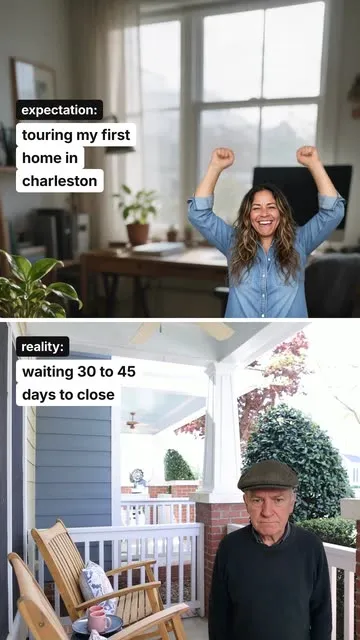


Real Postdom posts for sample brands, which aren't real businesses. Clips and photos are licensed stock or made with AI, as in the product.
It works from your whole site, so it keeps finding videos to make between new listings.
Postdom reads up to 16 pages of your site, such as listings, services, fees, the areas you cover and your FAQ. Every fact it keeps links to its page, and you can correct any of them.
How long closing takes, what a valuation includes, what to fix before listing, what one neighborhood is like against another.
A spoken-style hook, the facts on screen and clips matched to each line, in one of 38 video styles; or swipeable slides with one point each.
Approved posts go out at your posting times: videos to TikTok, Instagram Reels, YouTube Shorts, Facebook Reels and LinkedIn, slideshows to TikTok, Instagram, Facebook and LinkedIn. By default nothing posts until someone on your team approves it. If you approve 9 of your last 10 posts of one type without edits, Postdom can offer to post that type without review, and you decide.
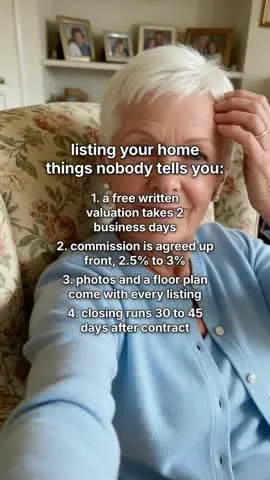
Wren Harbor Realty is a sample real estate team in Charleston. Postdom read its seller, valuation and FAQ pages and made this wall-of-text video for people thinking about listing their home.
| On the website | In the post |
|---|---|
| Topic: what to fix before listing | Hook: "listing your home, things nobody tells you:" |
| Home valuation: free written comparative market analysis within 2 business days | "1. a free written valuation takes 2 business days" |
| Seller listing service: commission agreed up front, typically 2.5% to 3% of the sale price | "2. commission is agreed up front, 2.5% to 3%" |
| Professional photos and a floor plan for every listing | "3. photos and a floor plan come with every listing" |
| FAQ: most purchases with a mortgage close 30 to 45 days after the contract is signed | "4. closing runs 30 to 45 days after contract" |
Four things a seller wants to know before calling an agent, each one from the team's own pages. The video needed no new listing to be worth posting.
This is the tool an agent means when they ask an AI chat for something that takes their website and makes their real estate videos. The address is the brief: your fees, your areas and your process are already written there.
A team site with buyer and seller guides gives Postdom the most to work with. A short site still works; the videos then lean on your services, your areas and the questions clients ask.
An AI real estate video generator writes the script, sets the words on screen and picks the footage for you. Postdom does each of those from your own site, so the numbers in the video are yours: your commission, your closing times, your valuation turnaround.
The footage is checked stock and AI-made shots picked to match each line, never another agent's listing photos. If a clip looks wrong, ask for another before the video posts.
A real estate listing video maker often means a tour of one home, cut from its photos. Postdom does a different job. It reads your site's listings for what they tell a buyer, such as the area, the price range and what is selling, and makes videos about those, with stock and AI-made footage rather than the home itself.
For a tour of one property, film it yourself with the seller's agreement, then upload the clip. Postdom posts your own video as it is, to every platform you connect. Read the real estate social media guide for the fair housing and photo-rights rules first.
What a valuation includes, what commission covers, what to fix before listing.
The steps from pre-approval to closing, and how long each one takes.
The neighborhoods you cover, one fact at a time.
These are the rules Postdom follows for agents. They work for videos you shoot yourself too.
Short videos are the main format for agents, and slideshows suit step-by-step guides. A video uses 30 credits; a slideshow or single image uses 10 credits.
| Format | What it is | Where it posts |
|---|---|---|
| Short video | Upright 9:16 video with on-screen text, clips matched to each line and music; one style adds an AI voiceover | TikTok, Instagram Reels, YouTube Shorts, Facebook Reels and LinkedIn |
| Slideshow | Swipeable photo slides with the text set the way the apps set it | TikTok, Instagram, Facebook and LinkedIn |
| Single image | One designed image, such as a price list or a this-vs-that card | TikTok, Instagram, Facebook and LinkedIn |
It makes short videos for an agent's social media. Postdom's reads your agency's website, writes videos and slideshows about buying, selling and your area, and posts the ones you approve.
Yes. Your first post is made free before you add a card, and then Postdom is free for 7 days on Starter, Growth or Scale: the trial makes up to 10 posts, and a real estate video can be one of them. After it, Starter is $39 a month for 30 posts. Cancel anytime.
Not the homes themselves. Postdom uses your listings for facts such as areas and price ranges, and builds videos from stock and AI-made footage. For a tour of one home, upload your own clip and Postdom posts it as it is.
Paste your agency's main address instead. Postdom reads your site's listings along with your service and area pages, and makes videos from all of it over the month.
You do, or your broker. Postdom has no fair housing check of its own, so every video waits for approval by default; the real estate guide lists the rules to check against.
Yes. Invite your broker to the workspace; by default nothing posts until someone on the team approves it.
A video uses 30 credits and a slideshow or image 10 credits, from the credits your plan includes each month.
Yes. Ask for new wording, a different hook, a shorter cut or another clip, or reject it. Each change to a video starts at 4 credits, from the credits your plan includes every month.
Enter your address and see the videos Postdom makes for you. Nothing posts until you or your broker approve it.