One page, one video
Good for a launch, a sale or a new article. You pick the page and the message.

Updated
Short vertical videos · Free plan, no card · You approve
Website to video, done for a business: enter your web address and Postdom keeps making short vertical videos about what you sell, each opening with a hook written to get watched. You approve each one, and it posts to TikTok, Instagram Reels, YouTube Shorts, Facebook Reels and LinkedIn.
Free plan, no card. Posts Postdom makes wait for your approval.
This is not a screen recording of your site. Postdom makes short social videos about what your business sells, using the facts on your pages.
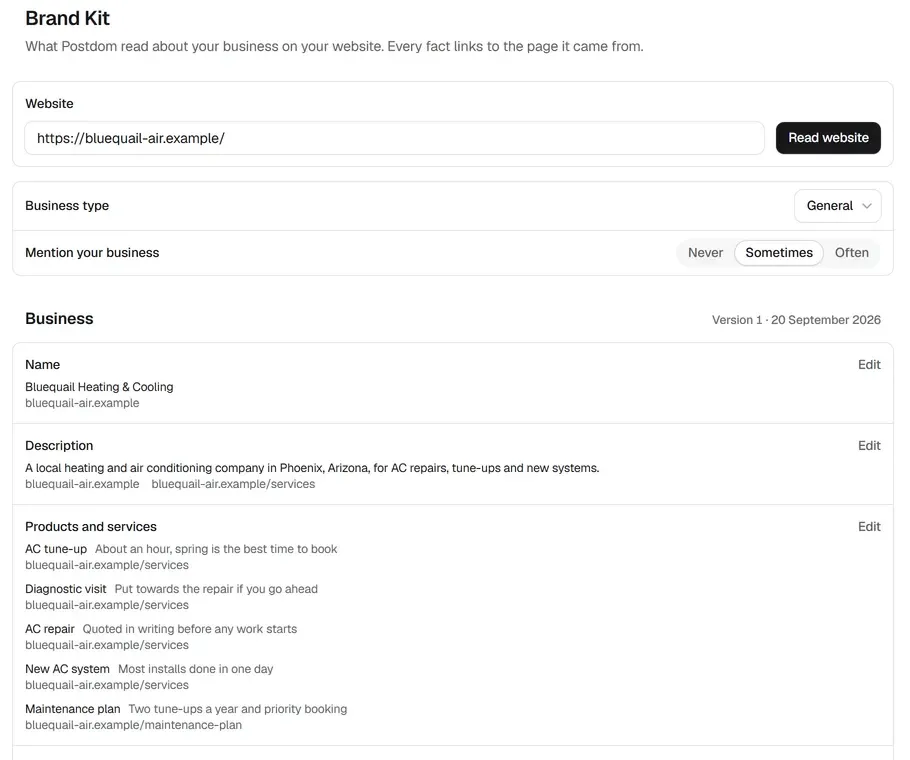
Postdom reads your main pages and builds a Brand Kit: what you do, your services and prices, and where you are. Every fact links to the page it came from, and you can edit any of them.
It looks for things worth a short video: a price people ask about, a service explained, a common mistake, a seasonal reminder.
A short hook, on-screen text in the native style of each app, a clip that fits the idea, music, and a caption to post with it.
Approved videos are scheduled inside your posting rules. They publish to TikTok, Instagram Reels, YouTube Shorts, Facebook Reels and LinkedIn.
Most URL to video tools take one page, such as a product or a blog post, and summarise it into one video. That works well for a one-off launch or an article you want to promote.
Postdom works the other way. It reads the whole site once, then keeps finding new angles from it, so you get a steady run of videos rather than one. If you have a single page you want a video for, the simplest route is a one-page tool. If you want to post every week without starting from a blank page, read the whole site.
Good for a launch, a sale or a new article. You pick the page and the message.
Good for a business that wants to post several times a week. The site supplies the facts, and the tool supplies the ideas.
Each of these is a vertical video, sized for the short-video feeds. You choose which styles are in your mix, and Postdom does not make the same kind twice in a row.
Plain on-screen text in the styles that perform well on each app, over a fitting clip. More videos use these than any other kind.
One real-life clip with the hook in the middle of the frame, and the story told in the caption underneath.
A reaction clip over a scene that fits your business, with one line of text. Light, and quick to watch.
One block of words over one clip: a hook, a turn, a short list and a soft ending. Easy to read with the sound off.
Videos Postdom makes are built from checked stock clips and AI-made shots. If a clip is wrong, ask for a different one with Make changes, which uses one credit, or reject the video.
Slideshows and single images come from the same website, for the days a video is not the right fit.
These are the rules Postdom writes to. They also work if you make videos yourself.
Sample brand by Postdom
A heating and air conditioning company in Phoenix, Arizona, invented by Postdom to show the product. Its website is bluequail-air.example.
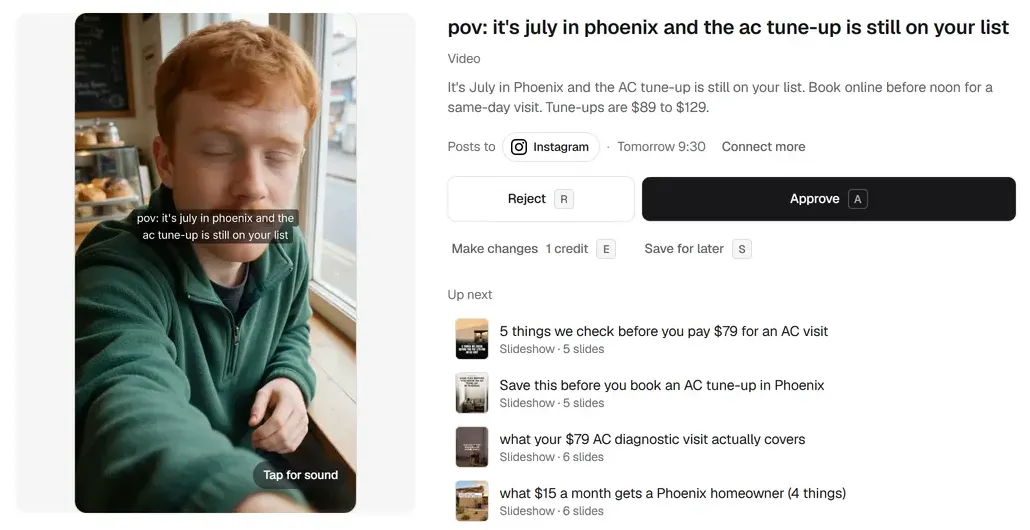
Sample brands are businesses Postdom made up to show the product. They are not real businesses or customers. The hook and caption below are from a video Postdom made in this sample workspace.
Short video
The tune-up price range came from the sample pricing page.
The city came from the sample description.
The clip opens on a person, with the hook as on-screen text.
Caption: It's July in Phoenix and the AC tune-up is still on your list. Book online before noon for a same-day visit. Tune-ups are $89 to $129.
Plans: Free, then Starter $39, Growth $99, Scale $229 and Pro $399 a month.
Each video counts as one post. Starter includes 30 posts a month, and any of them can be a video. The Free plan includes 1 post a month and 2 connected accounts, with a small Postdom watermark.
| Plan | Price a month | Posts a month | Connected accounts |
|---|---|---|---|
| Free | $0 | 1 | 2 |
| Starter | $39 | 30 | 3 |
| Growth | $99 | 60 | 10 |
| Scale | $229 | 150 | 20 |
| Pro | $399 | 300 | 30 |
By default, posts Postdom makes wait until someone on your team approves them. If most of a post type gets approved without edits, Postdom can offer to post that type without review, and you decide.
A way to make videos from the content of a website. You give the address, the tool reads the pages and turns what they say into short videos.
Postdom reads your whole website and chooses ideas from across it, rather than turning a single page you pick into one video. For a single page, a one-page URL to video tool may suit you better.
No. Postdom does not record your site. It reads what your pages say and makes short social videos about your business, with a hook, on-screen text, a clip and a caption.
No. Videos Postdom makes are built from checked stock clips and AI-made shots. When a video needs to show your own shop, staff or work, film it yourself and publish it through Postdom. If a clip is wrong, ask for a different one with Make changes, which uses one credit, or reject the video.
Yes. Postdom picks the music. For a different track, use Make changes and choose Different music, which uses one credit. On TikTok you can also send the video to your TikTok inbox and add a trending sound yourself.
The Free plan makes 1 post a month, and it can be a video, with a small Postdom watermark. No card is needed.
Videos Postdom makes publish to TikTok, Instagram Reels, YouTube Shorts, Facebook Reels and LinkedIn. Your own videos can go to all nine platforms Postdom connects.
No. Each video arrives ready to post. If you want something different, Make changes asks Postdom to rework it for one credit, or you can reject it.
Enter your address and see the videos Postdom makes for you. Nothing is published until you connect an account and approve one.